
📚 SCore Placeholders List
A SCore placeholder is a %tag% that gets replaced with a live value (player data, item data, block data, math, random numbers) when a command, condition, lore line or message runs. They work in any part of ExecutableItems, ExecutableBlocks and ExecutableEvents: commands, conditions, lore, messages, and SCore variables. SCore also parses every PlaceholderAPI placeholder in the same places, so %player_name%-style PAPI tags and SCore's own %player%-style tags can be mixed in the same line.
Table of Contents
- Player Placeholders
- Target / Entity Placeholders
- Item Placeholders
- Block Placeholders
- Projectile Placeholders
- Variables Placeholders
- Cooldown Placeholders
- Math Placeholders
- Utility & Text Placeholders
- Plugin-Specific Count Placeholders
- Event-Specific Placeholders
- Using PlaceholderAPI Placeholders in SCore
- Question ?
:::tip Numerical Operations All numerical placeholders support arithmetic operations:
- Increment:
%amount%+6(if %amount% = 15, result = 21) - Decrement:
%amount%-8(if %amount% = 14, result = 6) :::
Player Placeholders
Player placeholders are available in the activators where a player is involved. When the player is secondary in the activator, replace player with target (e.g., %target_health%). In ExecutableItems and ExecutableBlocks the item/block can have an Owner: replace player with owner to get the owner's placeholders (e.g., %owner_uuid%).
| Placeholder | Returns | Example |
|---|---|---|
%player% | Player's name | SEND_MESSAGE &aWelcome %player%! |
%player_uuid% | Player's UUID | SEND_MESSAGE &7Your UUID is %player_uuid% |
%player_uuid_array% | Player's UUID as [I;-1288600659,-373273272,-1897203511,898446696] | Used internally to store UUIDs in NBT-based commands |
%player_world% | World name (%player_world_lower% for lowercase) | execute in <<%player_world%>> run summon zombie 100 50 100 |
%player_x%, %player_y%, %player_z% | Coordinates (add _int for integers) | execute at %player% run setblock %player_x_int% %player_y_int% %player_z_int% air |
%player_pitch%, %player_pitch_positive% | Player's pitch (_int for integer) | SEND_MESSAGE &7Pitch: %player_pitch_int% |
%player_yaw%, %player_yaw_positive% | Player's yaw (_int for integer) | SEND_MESSAGE &7Yaw: %player_yaw_int% |
%player_direction% | Cardinal direction (N, SW, NE, etc.) | Condition: part1: '%player_direction%', comparator: EQUALS, part2: 'SW' |
%player_health% | Current health | SEND_MESSAGE &cHealth: %player_health% |
%player_max_health% | Maximum health | SEND_MESSAGE &cHealth: %player_health%/%player_max_health% |
%player_slot% | Slot that triggered the activator | SEND_MESSAGE &7Used from slot %player_slot% |
%player_slot_live% | Currently held slot | SEND_MESSAGE &7Holding slot %player_slot_live% |
%player_team% | Player's team (if any) | SEND_MESSAGE &7Team: %player_team% |
%player_attack_charge% | Attack cooldown (1.0 = fully charged) | Condition: part1: '%player_attack_charge%', type: PLAYER_NUMBER, comparator: SUPERIOR_OR_EQUALS, part2: '1.0' |
%last_damage_taken% | Last damage received (_int for integer) | SEND_MESSAGE &cYou took %last_damage_taken_int% damage |
%last_damage_dealt% | Last damage inflicted (_int for integer) VERSION | SEND_MESSAGE &aYou dealt %last_damage_dealt_int% damage |
%player_x_velocity%, %player_y_velocity%, %player_z_velocity% | Current X, Y, Z Velocity (_int for integer) | SEND_MESSAGE &7Y velocity: %player_y_velocity% |
Initial Player Placeholders
Captures player values at activator trigger time (won't change during execution):
%player_x_initial%,%player_y_initial%,%player_z_initial%%player_world_initial%%player_pitch_initial%,%player_yaw_initial%%player_direction_initial%
Target / Entity Placeholders
Entity placeholders are available in the activators where an entity is involved. When the entity is secondary in the activator, replace entity with target (e.g., %target_x%).
| Placeholder | Returns | Example |
|---|---|---|
%entity% | Entity type (UPPERCASE) | SEND_MESSAGE &7You hit a %entity% |
%entity_lower_case% | Entity type (lowercase) | SEND_MESSAGE &7You hit a %entity_lower_case% |
%entity_name% | Entity's custom name | SEND_MESSAGE &7Target: %entity_name% |
%entity_uuid% | Entity's UUID | Used to identify the target in NBT-based commands |
%entity_uuid_array% | Entity's UUID as [I;-1288600659,-373273272,-1897203511,898446696] | Used internally to store UUIDs in NBT-based commands |
%entity_x%, %entity_y%, %entity_z% | Coordinates (add _int for integers) | execute at %entity% run setblock %entity_x_int% %entity_y_int% %entity_z_int% air |
%entity_health% | Current health | SEND_MESSAGE &cTarget health: %entity_health% |
%entity_max_health% | Maximum health | SEND_MESSAGE &cTarget health: %entity_health%/%entity_max_health% |
%entity_world% | World name | SEND_MESSAGE &7Entity world: %entity_world% |
%entity_direction% | Facing direction | Condition: part1: '%entity_direction%', comparator: EQUALS, part2: 'N' |
%entity_pitch%, %entity_yaw% | Rotation values | SEND_MESSAGE &7Yaw: %entity_yaw% |
%entity_team% | Entity's team (if any) | SEND_MESSAGE &7Team: %entity_team% |
%entity_serialized% | Full entity definition | Used to copy/restore an entity in advanced commands |
%entity_last_damage_taken% | Last damage received (add _int for integers). The _final variants only exist in the ExecutableEvents entity damage events, see activator placeholders | SEND_MESSAGE &cTarget took %entity_last_damage_taken_int% damage |
%entity_x_velocity%, %entity_y_velocity%, %entity_z_velocity% | Current X, Y, Z Velocity (_int for integer) | SEND_MESSAGE &7Target Y velocity: %entity_y_velocity% |
Item Placeholders
| Placeholder | Returns | Example |
|---|---|---|
%name% | ExecutableItem's name | SEND_MESSAGE &aYou used %name% |
%id% | ExecutableItem's ID | SEND_MESSAGE &7Item ID: %id% |
%amount% | Amount in current stack | SEND_MESSAGE &7You have %amount% in this stack |
%usage% | Current usage count | SEND_MESSAGE &7Usage: %usage%/%usage_limit% |
%usage_roman% | Usage in Roman numerals | ADD_ITEM_LORE &7Usage: %usage_roman% |
%usage_bar(amount:30,color1:&d,color2:&5,symbol:I)% | Visual usage bar, more info below | ADD_ITEM_LORE %usage_bar(amount:30,color1:&d,color2:&5,symbol:I)% |
%usage_limit% | Maximum usage limit | SEND_MESSAGE &7Usage: %usage%/%usage_limit% |
%durability% | Item durability (1.14+) | SEND_MESSAGE &7Durability left: %durability% |
%max_use_per_day_item% | Daily usage limit (item) | Condition: part1: '%max_use_per_day_item%', type: PLAYER_NUMBER, comparator: SUPERIOR, part2: '0' |
%max_use_per_day_activator% | Daily usage limit (activator) | Condition: part1: '%max_use_per_day_activator%', type: PLAYER_NUMBER, comparator: SUPERIOR, part2: '0' |
Special: %usage_bar(amount:30,color1:&d,color2:&5,symbol:|)%
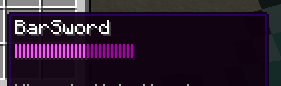
- Creates a visual usage bar
- Parameters: amount (bar count), color1 (used), color2 (unused), symbol
Block Placeholders
Block placeholders are available in the activators where a block is involved. When the block is secondary in the activator, replace block with target_block (e.g., %target_block_x%).
| Placeholder | Returns | Example |
|---|---|---|
%block% | Block type (UPPERCASE) | SEND_MESSAGE &7You broke %block% |
%block_lower% | Block type (lowercase) | SEND_MESSAGE &7You broke %block_lower% |
%block_live%, %block_live_lower% | Current block type | SEND_MESSAGE &7Current block: %block_live% |
%block_item_material% | Item form of block (crops give their seeds, WALL_TORCH gives TORCH, OAK_WALL_SIGN gives OAK_SIGN, POTTED_DANDELION gives DANDELION…) | Used to give the matching item for a placed block |
%block_x%, %block_y%, %block_z% | Coordinates (add _int for integers) | execute at %player% run setblock %block_x_int% %block_y_int%+1 %block_z_int% air |
%blockface% | Selected block face | SEND_MESSAGE &7Face: %blockface% |
%block_world% | World name | execute in <<%block_world%>> run setblock %block_x_int% %block_y_int% %block_z_int% air |
%block_biome% | Biome name | Condition: part1: '%block_biome%', comparator: EQUALS, part2: 'DESERT' |
%block_dimension% | World type (nether, normal, end) | Condition: part1: '%block_dimension%', comparator: EQUALS, part2: 'nether' |
%block_spawnertype% | Spawner mob type | SEND_MESSAGE &7Spawner: %block_spawnertype% |
%block_is_ageable% | Returns if the block is ageable or not | Condition: part1: '%block_is_ageable%', comparator: EQUALS, part2: 'true' |
%block_eb_id% | ExecutableBlock ID (if applicable) | SEND_MESSAGE &7EB ID: %block_eb_id% |
%block_data% | Block data value | SEND_MESSAGE &7Block data: %block_data% |
Projectile Placeholders
Projectile placeholders are available in the activators where a projectile is involved.
| Placeholder | Returns | Example |
|---|---|---|
%projectile% | Projectile type (UPPERCASE) | SEND_MESSAGE &7You shot a %projectile% |
%projectile_lower_case% | Projectile type (lowercase) | SEND_MESSAGE &7You shot a %projectile_lower_case% |
%projectile_name% | Custom projectile name | SEND_MESSAGE &7Projectile: %projectile_name% |
%projectile_uuid% | Projectile's UUID | Used to identify the projectile in NBT-based commands |
%projectile_uuid_array% | Projectile's UUID as [I;-1288600659,-373273272,-1897203511,898446696] | Used internally to store UUIDs in NBT-based commands |
%projectile_x%, %projectile_y%, %projectile_z% | Coordinates | execute at %player% run summon minecraft:lightning_bolt %projectile_x% %projectile_y% %projectile_z% |
%projectile_world% | World name | SEND_MESSAGE &7World: %projectile_world% |
%bow_force% | Bow shot force (0-1) | Condition: part1: '%bow_force%', type: PLAYER_NUMBER, comparator: SUPERIOR_OR_EQUALS, part2: '0.9' |
Variables Placeholders
Item/Block Variables
String/Number Variables:
%var_X%- Value of variable X%var_X_int%- Integer value of variable X (only for NUMBER type variables)%var_X_roman%- Roman numeral value (only for NUMBER type variables)
List Variables:
%var_MYVAR%- Full list with brackets%var_MYVAR_size%- Number of elements%var_MYVAR_contains_VALUE%- Check if list contains VALUE
Example: ADD_ITEM_LORE &7Defense: %var_defense%
SCore Variables (Global / Per-Player)
SCore also has its own global or per-player variable system, independent from item/block variables. See SCore Variables for the /score variables commands. Once PlaceholderAPI is installed, these variables are exposed as:
%score_variables_<variable-id>%%score_variables_<variable-id>_int%%score_variables_<variable-id>_<index>%(list, value at index)%score_variables-contains_<variable-name>_<value>%(list, boolean)%score_variables-size_<variable-name>%(list, size)
Cooldown Placeholders
Format: %score_cooldown_{plugin}:{object_id}:{activator_id}%
| Placeholder | Returns | Example |
|---|---|---|
%score_cooldown_EI:Free_Lottery:activator1% | Remaining cooldown for an ExecutableItems activator | SEND_MESSAGE &7Cooldown left: %score_cooldown_EI:Free_Lottery:activator1% |
%score_cooldown_EB:MyBlock:activator2% | Remaining cooldown for an ExecutableBlocks activator | SEND_MESSAGE &7Cooldown left: %score_cooldown_EB:MyBlock:activator2% |
Math Placeholders
All numerical SCore placeholders support inline arithmetic directly after the tag:
%amount%+6(if%amount%= 15, result = 21)%amount%-8(if%amount%= 14, result = 6)
For anything beyond a single +/- operation (multiplication, division, nested expressions), use PlaceholderAPI's math placeholder around a SCore placeholder:
%math_0_(%usage%)*10%multiplies the item's%usage%by 10.%math_{score_variables_userLevel}*10%multiplies the SCore variableuserLevelby 10 (see Using PlaceholderAPI Placeholders in SCore).
SCore placeholders are parsed before PlaceholderAPI placeholders, so %math_...% always receives the already-resolved SCore value.
Utility & Text Placeholders
| Placeholder | Returns | Example |
|---|---|---|
%rand:MIN|MAX% | Random number between MIN and MAX | SEND_MESSAGE &6You rolled %rand:1|100% |
%timestamp% | Current timestamp | SEND_MESSAGE &7Time: %timestamp% |
%activator_id% | ID of current activator | SEND_MESSAGE &7Activator: %activator_id% |
%activator_name% | Name of current activator | SEND_MESSAGE &7Activator: %activator_name% |
AROUND & NEAREST Commands
Use player/entity placeholders with the around_target prefix:
%around_target_direction%%around_target_health%%around_target_uuid%- If
%around_target%fails, use%around_target::step1%
Example: AROUND 10 execute at %around_target% run summon lightning_bolt ~ ~ ~ <+> SEND_MESSAGE &cYou got smited!
DAMAGE Commands
| Placeholder | Returns | Example |
|---|---|---|
%score_cmd-damage-boost% | Current damage boost | SEND_MESSAGE &cDamage boost: %score_cmd-damage-boost% |
%score_cmd-damage-resistance% | Current damage resistance | SEND_MESSAGE &cDamage resistance: %score_cmd-damage-resistance% |
Attack Charge: %player_attack_charge% resets after the DAMAGE command runs, so check its value before using it.
Message/Command Placeholders
For PLAYER_WRITE_COMMAND and PLAYER_SEND_MESSAGE:
| Placeholder | Returns | Example |
|---|---|---|
%arg0%, %arg1%, %arg2%, etc. | Individual command arguments | SEND_MESSAGE &7First argument: %arg0% |
%all_args% | All arguments | SEND_MESSAGE &7Args: %all_args% |
%all_args_without_first% | All except first argument | SEND_MESSAGE &7Args: %all_args_without_first% |
Plugin-Specific Count Placeholders
ExecutableItems
%executableitems_checkamount%- Total EI in inventory- Arguments (use commas between values to provide multiple values):
slot: Slots to check. Do not use this argument if you want all slots to be evaluated.id: ID of the ei item you want to check.owner: Only count if the owner value is correctowneruuid: Only count if the owner uuid value is correct
- Examples:
%executableitems_checkamount_slot:0,2,3%- EI in specific slots%executableitems_checkamount_id:item1,item2_slot:0,2%- Specific items in slots%executableitems_checkamount_owner:Special70%
%executableitems_checkvar%- Value / Total Value of Variable values- Arguments (use commas between values to provide multiple values):
slot: Slots to check. Do not use this argument if you want all slots to be evaluated.id: ID of the ei item you want to check.var: The variable id you want to check.
- Examples:
%executableitems_checkvar_id:star_man_var:defense%%executableitems_checkvar_slot:-1,40_var:atk_bonus%%executableitems_checkvar_var:defense,bonus_defense%
%executableitems_set_<id>%PREMIUM - Number of pieces of the set<id>the player wears%executableitems_set_<id>_tier%- Highest active tier of the set (number of pieces),0if none
- If the first detected variable value is a string, the value will be returned immediately.
- If the rest of the detected variable value is a number, it will add them all up and return the total value.
- Currently does not support list variables.
ExecutableBlocks
%executableblocks_checkamount%- Total EB in inventory- Arguments (use commas between values to provide multiple values):
slot: Slots to check. Do not use this argument if you want all slots to be evaluated.id: ID of the ei item you want to check.owner: Only count if the owner value is correctowneruuid: Only count if the owner uuid value is correct
- Examples:
%executableblocks_checkamount_slot:0,2,3%- EB in specific slots%executableblocks_checkamount_id:block1,block2_slot:0,2%- Specific blocks in slots%executableblocks_checkamount_owner:Special70%
Event-Specific Placeholders
These placeholders are only available inside the matching event activator.
| Activator | Placeholders |
|---|---|
| RAID_TRIGGER | %player%, %badomenlevel% |
| RAID_WAVE | %raiders% (UUID list) |
| RAID_FINISH | %badomen%, %heroes% (UUID list) |
| PLAYER_EXPERIENCE_CHANGE | %experience% |
| PLAYER_RECEIVE_EFFECT | %effect_received%, %effect_received_level%, %effect_received_duration% |
| PLAYER_HIT_ENTITY | %critical% (true/false) |
| PLAYER_TELEPORT | %teleport_cause% |
| BROADCAST_MESSAGE | %message%, %is_async% |
| PLUGIN_ENABLE/DISABLE | %plugin_name% |
| PLAYER_ADVANCEMENT | %advancement% (Only for 1.19+) |
| PLAYER_RECEIVE_HIT_GLOBAL, PLAYER_RECEIVE_HIT_BY_PLAYER, PLAYER_RECEIVE_HIT_BY_ENTITY | %last_damage_taken_nonfinal%, %last_damage_taken_nonfinal_int% refer to the raw damage taken. %last_damage_taken_final%, %last_damage_taken_final_int% refer to the damage taken after defense buffs (attributes, resistance effect, armor). Only direct hits give the correct value; receiving hits from projectiles returns 0 |
| ENTITY_DAMAGE_BY_PLAYER, ENTITY_DAMAGE_BY_ENTITY, ENTITY_DAMAGE_BY_BLOCK (EE) | %entity_last_damage_taken_final%, %entity_last_damage_taken_final_int% refer to the damage taken after defense buffs (armor, resistance…). ENTITY_DAMAGE_BY_PLAYER also gives %entity_last_damage_taken_final_with_booster% and %entity_last_damage_taken_final_with_booster_int%, the final damage including the damage boosts |
| PLAYER_BLOCK_HIT_OF_PLAYER, PLAYER_BLOCK_HIT_OF_ENTITY | %damage_blocked_base%, %damage_blocked_base_int% returns the raw damage blocked by the shield |
| PLAYER_PICKUP_ITEM (EE) | 1.13+: %item_type%, %item_name%, %item_amount%. 1.14-1.21.3: %item_cmdata% (-1 if null). 1.21.4+: %item_cmdata_s_0% ("null" if empty), %item_cmdata_f_0% (-1 if empty) (first string/float custom model data value, since 1.21.4+ custom model data is stored in an array) |
| PLAYER_INVENTORY_CLICK (EE) | %is_shift_click%, %is_mouse_click%, %is_left_click%, %is_right_click%, %is_keyboard_click%, %is_creative_action%, %get_action% (Reference Enum Values), %before_slot%, %after_slot%, %inventory_type% (Reference Enum Values), %inventory_title% (1.21+) |
| PLAYER_KILL_ENTITY | %last_hitter%: mob type of who dealt the last blow. Useful to check whether you or your pet wolf dealt the last blow, e.g. PLAYER, WOLF |
Using PlaceholderAPI Placeholders in SCore
PlaceholderAPI is one of the main pillars for building items and blocks: any installed PlaceholderAPI placeholder (%vault_eco_balance%, %luckperms_prefix%, etc.) can be used anywhere SCore reads text, using the same %...% syntax:
- Lore
- Commands section
- Messages (all message types: cooldown message, condition not met message, required things message, etc.)
- Variables
- etc.
SCore's own placeholders are parsed before PlaceholderAPI placeholders, so a PAPI expression can safely wrap a SCore one, as in the math example above (%math_{score_variables_userLevel}*10%).
Related Documentation
Question ?
Is SCore compatible with PlaceholderAPI? Yes. Any PlaceholderAPI placeholder works in lore, commands, messages and variables across ExecutableItems, ExecutableBlocks and ExecutableEvents. SCore's own placeholders are parsed first, so the two syntaxes can be combined in the same line without conflict.
Can I do math with placeholders?
Simple increment/decrement works directly: %amount%+6 or %amount%-8. For multiplication, division or nested expressions, wrap the SCore placeholder in PlaceholderAPI's math placeholder, e.g. %math_0_(%usage%)*10%.
How do I use a PlaceholderAPI placeholder in an ExecutableItems command?
Write it exactly like any SCore placeholder, inline in the command string, for example SEND_MESSAGE &7Balance: %vault_eco_balance%. It works in commands, conditions, lore and every message type, no extra setup beyond having PlaceholderAPI and the source plugin installed.
What's the difference between %var_X% and %score_variables_X%?
%var_X% reads an item/block-scoped variable stored directly on that ExecutableItem or ExecutableBlock. %score_variables_<id>% reads a global or per-player SCore variable, managed with /score variables and exposed through PlaceholderAPI.
Why does %around_target% sometimes not work?
On some activators the target isn't resolved on the first reference. Use %around_target::step1% instead, which is the documented fallback for AROUND/NEAREST commands.
Try it now
Copy this into ExecutableItems and reload
From the SCore custom commands reference. Paste it into a config, run the plugin's reload command, and you have a working starting point to edit.
activators:
  activator0: # Activator ID, you can create as many activator on the activators list
    option: # Here goes an activator that is at least instance of player
    playerCommands:
    - ABSORPTION amount:5 time:200 # Gives the player absorption
  activator1: # Activator ID, you can create as many activator on the activators list
    option: # Here goes an activator that is at least instance of target
    targetCommands:
- ABSORPTION amount:5 time:200 # Gives the target absorptionPlugin used on this page
ExecutableItemsCustom items with abilities, activators and commands — no code.
- 5.0/5 from 10 reviews
- 2.9K servers running it right now (bStats)
- 90 downloads on SPlugins
€19.99
one-time, lifetime updates