
Block as player head
- If you'd like your ExecutableBlock to be a player head you need to first:
- Create an EI Item (ExecutableItem) /ei create <id>

- Set the material to PLAYER_HEAD
- Use the features related to it to add a texture to it (link below)
-
And once the EI Item is ready, create your EB Block. And inside the MAIN GUI
-
On CreationType select IMPORT_FROM_EXECUTABLE_ITEMS
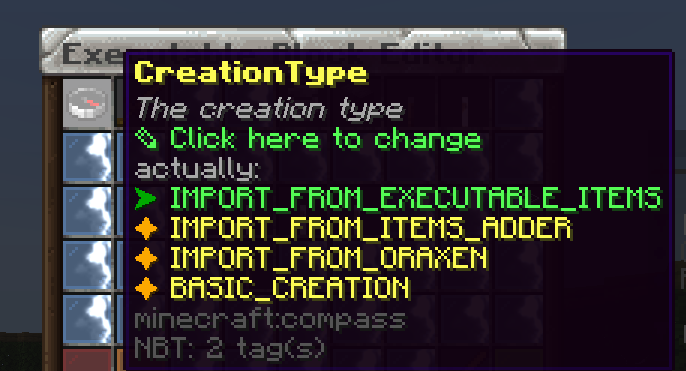
-
And select the EI you created
-
Then save and that's it, now your EB is a custom texture PLAYER_HEAD
Try it now
Copy this into ExecutableBlocks and reload
From the SCore custom commands reference. Paste it into a config, run the plugin's reload command, and you have a working starting point to edit.
activators:
  activator0: # Activator ID, you can create as many activator on the activators list
    option: # Here goes an activator that is at least instance of player
    playerCommands:
    - ABSORPTION amount:5 time:200 # Gives the player absorption
  activator1: # Activator ID, you can create as many activator on the activators list
    option: # Here goes an activator that is at least instance of target
    targetCommands:
- ABSORPTION amount:5 time:200 # Gives the target absorptionPlugin used on this page
ExecutableBlocksCustom blocks that react to players, with activators and commands.
- 5.0/5 from 8 reviews
- 400 servers running it right now (bStats)
- 22 downloads on SPlugins
€14.49
one-time, lifetime updates
Created Oct 26, 2025Last updated Jun 22, 2026 by Ssomar
Edit this page on GitHub