
本页面借助 AI 从英文翻译而来。改进此翻译或阅读英文原文。
玩家与目标命令
原版命令的“多世界”兼容性。
execute in <<NAMEOFYOUR_WORLD>> run ...
示例:你想在世界 SsomarWorld 中生成一只 Zombie:
execute in <<SsomarWorld>> run summon zombie 100 50 100
使用占位符的示例:
execute in <<%player_world%>> run summon zombie 100 50 100
想在命令中保留原始 HEX 形式吗?请在命令中添加标签 BRUT_HEX。它可以放在命令行的任何位置,但建议放在命令的最前面,以免造成混淆。
默认情况下,如果玩家离线,所有命令都不会被执行。(命令会在玩家连接时执行)
但你可以在命令中添加标签 [<OFFLINE>] 来解除此限制。
(对 broadcast、boost、giveall 等命令非常有用……)
示例:
- [<OFFLINE>] broadcast hello !
- [<OFFLINE>] execute at %player% run setblock %block_x_int%+3 %block_y_int%-1 %block_z_int%-14 minecraft:air
如果你希望在玩家断开连接时清除命令,可以使用 [<CLEAR_IF_DISCONNECT>]
示例:
- [<CLEAR_IF_DISCONNECT>] say meow
混合命令
除了以下命令列表之外,你还可以使用:
docs/tools-for-all-plugins-score/custom-commands/mixed-commands-player-and-entity
这些命令可用于玩家相关命令或实体相关命令。
自定义命令
按字母顺序排列
ABSORPTION
- 信息:给予玩家吸收效果
- 命令设置:
{amount}:吸收半颗心的数量。支持负值以移除。{time}:效果持续时间(以 tick 为单位)。若希望无限持续,请留空或设为 "0"。
- 示例:
activators:
  activator0: # Activator ID, you can create as many activator on the activators list
    option: # Here goes an activator that is at least instance of player
    playerCommands:
    - ABSORPTION amount:5 time:200 # Gives the player absorption
  activator1: # Activator ID, you can create as many activator on the activators list
    option: # Here goes an activator that is at least instance of target
    targetCommands:
    - ABSORPTION amount:5 time:200 # Gives the target absorption
你的 MAX_ABSORPTION 属性值必须大于 0!
输入以下命令检查该值:/attribute PLAYER_NAME minecraft
_absorption base get你可以输入以下命令来提高它:/attribute PLAYER_NAME minecraft
_absorption base set 20activators:
activator0: # Activator ID, you can create as many activator on the activators list
option: # Here goes an activator that is at least instance of player
playerCommands:
# You can do that to temporary up the max_absorption value of the player
- minecraft:attribute %player% minecraft:max_absorption base set 5**
- ABSORPTION amount:5 time:200
- DELAY_TICK 200
- minecraft:attribute PLAYER_NAME minecraft:max_absorption base set 0
activator1: # Activator ID, you can create as many activator on the activators list
option: # Here goes an activator that is at least instance of target
targetCommands:
# You can do that to temporary up the max_absorption value of the target
- minecraft:attribute %player% minecraft:max_absorption base set 5
- ABSORPTION amount:5 time:200
- DELAY_TICK 200
- minecraft:attribute PLAYER_NAME minecraft:max_absorption base set 0
ACTIONBAR
- 信息:显示动作栏,包含你的文本和剩余时间(59、58、57……)。
- 命令设置:
{text}:要显示的文本{delay}:持续时间(以秒为单位)
- 示例:
activators:
  activator0: # Activator ID, you can create as many activator on the activators list
    option: # Here goes an activator that is at least instance of player
    playerCommands:
    - `ACTIONBAR &6Hey &e%player% ! 10` # Sends an ACTIONBAR to the player
  activator1: # Activator ID, you can create as many activator on the activators list
    option: # Here goes an activator that is at least instance of target
    targetCommands:
    - `ACTIONBAR &6Hey &e%player% ! 10`# Sends an ACTIONBAR to the target
ADD_ITEM_ATTRIBUTE
- 信息:以加法或减法运算为物品添加属性。
- 命令设置:
{slot}:应用的栏位。-1 表示主手{attribute}:你想添加的属性。属性列表{value}:运算的值{equipmentSlot}:属性生效的栏位。EquipmentSlot 列表{mode}:选择添加模式mode:ADD:将属性添加到物品mode:OVERRIDE:移除物品上相同类型的现有属性,并将该属性添加到物品mode:STACK:与物品上已有的属性叠加,如果不存在则添加
- affectDefaultAttributes:true 或 false # 为 true 时,OVERRIDE 模式也会覆盖默认属性,而 stack 模式则允许与默认属性叠加(绿色)
- 示例:
activators:
  activator0: # Activator ID, you can create as many activator on the activators list
    option: # Here goes an activator that is at least instance of player
    playerCommands:
    - ADD_ITEM_ATTRIBUTE slot:%slot% attribute:GENERIC_ATTACK_DAMAGE value:1.0 equipmentSlot:HAND mode:ADD # Add this attribute to the player
  activator1: # Activator ID, you can create as many activator on the activators list
    option: # Here goes an activator that is at least instance of target
    targetCommands:
    - ADD_ITEM_ATTRIBUTE slot:%slot% attribute:GENERIC_ATTACK_DAMAGE value:1.0 equipmentSlot:HAND mode:STACK affectDefaultAttributes: true # Add this attribute to the target
ADD_ITEM_ENCHANTMENT
- 信息:在指定栏位的物品上添加指定等级的附魔
- 命令设置:
{slot}:应用的栏位。-1 表示主手{enchantment}:你想应用的附魔,不要使用空格,使用 Minecraft 的附魔名称而不是显示名称。附魔{level}:附魔的等级
- 示例:
activators:
  activator0: # Activator ID, you can create as many activator on the activators list
    option: # Here goes an activator that is at least instance of player
    playerCommands:
    - ADD_ITEM_ENCHANTMENT slot:-1 enchantment:unbreaking level:1
  activator1: # Activator ID, you can create as many activator on the activators list
    option: # Here goes an activator that is at least instance of target
    targetCommands:
    - ADD_ITEM_ENCHANTMENT slot:-1 enchantment:unbreaking level:1
ADD_ITEM_LORE
- 信息:添加一行 lore
- 命令设置:
{slot}:应用的栏位。-1 表示主手{text}:新 lore 行的文本
- 示例:
activators:
  activator0: # Activator ID, you can create as many activator on the activators list
    option: # Here goes an activator that is at least instance of player
    playerCommands:
    - ADD_ITEM_LORE slot:%slot% text:&7Item of %player%
  activator1: # Activator ID, you can create as many activator on the activators list
    option: # Here goes an activator that is at least instance of target
    playerCommands:
    - ADD_ITEM_LORE slot:%slot% text:&7Item of %target% added by %player%
BOOTS
- 信息:将你主手中的物品放入靴子栏位。(如果物品带有“绑定诅咒”则无效)
- 无命令设置
- 示例:
activators:
  activator0: # Activator ID, you can create as many activator on the activators list
    option: # Here goes an activator that is at least instance of player
    playerCommands:
    - BOOTS
BOSSBAR
- 信息:创建一个持续一定时间的 bossbar 文本。
- 命令设置:
{time}:bossbar 的持续时间(以 tick 为单位){color}:bossbar 文本的颜色{text}:bossbar 上的文本(使用下划线 "_" 在参数中添加空格。){count}:你希望计数的次数- 如果存在此选项,则时间参数不再起作用
{countTicks}:true/false,表示是否改为以 tick 或以秒计数{countOrder}:- ascending:计时器从 0 开始计数
- descending:计时器从给定的值开始倒计时
{overrideMode}:- NO_OVERRIDE:不覆盖其他 Bossbar
- OVERRIDE_ALL:覆盖 SCore 发送的所有其他 BossBar
- OVERRIDE_SAME_TEXT:覆盖 SCore 发送的包含相同文本的其他 Bossbar
{barProgress}:(默认值 = 1.0)进度条的初始进度(0.0 到 1.0)。同时适用于静态进度条和倒计时进度条(仅限 descending 倒计时)
- 示例:
activators:
  activator0: # Activator ID, you can create as many activator on the activators list
    option: # Here goes an activator that is at least instance of player
    playerCommands:
    - BOSSBAR time:200 color:RED text:This_is_a_bossbar text
    - BOSSBAR time:20 color:BLUE text:Hello_world count:50 countTicks:true countOrder:ascending
    - BOSSBAR time:200 color:RED text:This is a bossbar text overrideMode:OVERRIDE_SAME_TEXT
    - BOSSBAR time:200 color:GREEN text:Half filled bar barProgress:0.5
CANCEL_PICKUP
- 信息:在一段时间内禁止玩家拾取物品
- 命令设置:
{time}:玩家在多少 tick 之后才能再次拾取物品{material}:如果设置,玩家只是无法拾取指定的材质,如果为 null 则无法拾取任何物品
- 示例:
activators:
  activator0: # Activator ID, you can create as many activator on the activators list
    option: # Here goes an activator that is at least instance of player
    playerCommands:
    - CANCEL_PICKUP time:600
    - CANCEL_PICKUP time:600 material:stone
在设置了 tick 时间之后,重置此命令的唯一方法是重载或重启服务器。如果你希望有重置的方法,请在 Discord 的 #suggestions 频道中提出建议。
CHAT
- 信息:以玩家的身份向聊天发送一条消息
- 命令设置:
{text}:要发送的文本
- 示例:
activators:
  activator0: # Activator ID, you can create as many activator on the activators list
    option: # Here goes an activator that is at least instance of player
    playerCommands:
    - CHAT &6Hello !!
CHESTPLATE
- 信息:将你主手中的物品放入胸甲栏位。(如果物品带有“绑定诅咒”则无效)
- 无命令设置
- 示例:
activators:
  activator0: # Activator ID, you can create as many activator on the activators list
    option: # Here goes an activator that is at least instance of player
    playerCommands:
    - CHESTPLATE
CLOSE_INVENTORY
- 信息:为玩家关闭物品栏
- 无命令设置
- 示例:
activators:
  activator0: # Activator ID, you can create as many activator on the activators list
    option: # Here goes an activator that is at least instance of player
    playerCommands:
    - CLOSE_INVENTORY
CROPS_GROWTH_BOOST
- 信息:加速你周围作物的生长
- 命令设置:
{radius}:加速的半径(默认 5){delay}:每次生长加速之间的延迟(以 tick 为单位){duration}:整个加速的持续时间(以 tick 为单位){chance}:应用加速时方块生长的几率
- 示例:
以下命令会每 10 tick 产生一次生长加速,共 20 次。
应用加速时,半径内的所有方块都有 50% 的几率生长。
activators:
  activator0: # Activator ID, you can create as many activator on the activators list
    option: # Here goes an activator that is at least instance of player
    playerCommands:
    - CROPS_GROWTH_BOOST radius:5 delay:10 durations:200 chance:50
DISABLE_FLY_ACTIVATION
- 信息:禁止玩家使用飞行(使用鞘翅滑翔不被视为飞行)
- 命令设置:
{time}:效果的持续时间(以秒为单位)
- 示例:(下面的命令会在 1 分钟内禁用飞行的激活)
activators:
  activator0: # Activator ID, you can create as many activator on the activators list
    option: # Here goes an activator that is at least instance of player
    playerCommands:
    - DISABLE_FLY_ACTIVATION time:60
DISABLE_GLIDE_ACTIVATION
- 信息:在一段时间内禁止使用鞘翅
- 命令设置:
{time}:效果的持续时间(以秒为单位)
- 示例:(下面的命令会在 20 秒内禁用鞘翅)
activators:
  activator0: # Activator ID, you can create as many activator on the activators list
    option: # Here goes an activator that is at least instance of player
    playerCommands:
    - DISABLE_GLIDE_ACTIVATION time:20
EICOOLDOWN
- 信息:为指定的 ExecutableItems 应用冷却
- 命令设置:
{PLAYER}:命令的目标玩家{ID}:ExecutableItem 的 id,或使用 "all" 表示所有 ExecutableItems{DURATION}:时间长度{boolean TICKS}:(默认值:false)如果为 false,duration 参数的值将视为秒。如果为 true,则视为 tick。[optional activator id]:(可选)你可以将其应用于指定的激活器 id
- 示例:
activators:
  activator0: # Activator ID, you can create as many activator on the activators list
    option: # Here goes an activator that is at least instance of player
    playerCommands:
    - EICOOLDOWN %player% thisismyid 10 true # For the ExecutableItem thisismyid
    - EICOOLDOWN %player% all 10 true # For all ExecutableItems
EICOOLDOWN 只能添加冷却:当同一激活器上同时运行多个冷却时,以最长的为准。若要缩短或移除冷却,请使用 EICOOLDOWN_RESET。
EICOOLDOWN_RESET
- 信息:移除玩家某个 ExecutableItem 的冷却(其所有激活器,或仅某一个激活器)。原版的视觉冷却(
enableVisualCooldown)也会被重置。 - 命令设置:
{PLAYER}:命令的目标玩家{ID}:ExecutableItem 的 id,或使用 "all" 表示所有 ExecutableItems[optional activator id]:(可选)仅移除此激活器的冷却;其他激活器保留各自的冷却
- 示例:
activators:
  activator0: # Activator ID, you can create as many activator on the activators list
    option: # Here goes an activator that is at least instance of player
    playerCommands:
    - EICOOLDOWN_RESET %player% thisismyid activator1 # Only activator1 of the ExecutableItem thisismyid
    - EICOOLDOWN_RESET %player% thisismyid # All the activators of thisismyid
    - EICOOLDOWN_RESET %player% all # All ExecutableItems
在控制台中,/score cooldowns clear EI:{ID}:{activator id} {player} 可对单个激活器执行相同的操作。
EBCOOLDOWN
- 信息:为指定的 ExecutableBlocks 应用冷却
- 命令设置:
{PLAYER}:命令的目标玩家{ID}:ExecutableBlocks 的 id,或使用 "all" 表示所有 ExecutableBlocks{DURATION}:时间长度{boolean TICKS}:(默认值:false)如果为 false,duration 参数的值将视为秒。如果为 true,则视为 tick。[optional activator id]:(可选)你可以将其应用于指定的激活器 id
- 示例:
activators:**
  activator0: # Activator ID, you can create as many activator on the activators list
    option: # Here goes an activator that is at least instance of player
    playerCommands:
    - EBCOOLDOWN %player% thisismyid 10 true # For the ExecutableBlock thisismyid
    - EBCOOLDOWN %player% all 10 true # For all ExecutableBlocks
EECOOLDOWN
- 信息:为指定的 ExecutableEvents 应用冷却
- 命令设置:
{PLAYER}:命令的目标玩家{ID}:ExecutableEvent 的 id,或使用 "all" 表示所有 ExecutableEvents{DURATION}:时间长度{boolean TICKS}:(默认值:false)如果为 false,duration 参数的值将视为秒。如果为 true,则视为 tick。[optional activator id]:(可选)你可以将其应用于指定的激活器 id
- 示例:
activators:
  activator0: # Activator ID, you can create as many activator on the activators list
    option: # Here goes an activator that is at least instance of player
    playerCommands:
    - EECOOLDOWN %player% thisismyid 10 true # For the ExecutableEvent thisismyid
    - EECOOLDOWN %player% all 10 true # For all ExecutableEvents
FIREWORK_BOOST
- 信息:如果施放者在使用鞘翅滑翔时执行此命令,将生成一枚烟花火箭,效果类似于玩家在滑翔时右键手中的烟花以获得推进距离。
- 命令设置:
{duration}:烟花的存在时间(以秒为单位)
- 示例:
activators:
  activator0: # Activator ID, you can create as many activator on the activators list
    option: # Here goes an activator that is at least instance of player
    playerCommands:
    - FIREWORK_BOOST 20
FLY OFF
- 信息:禁用玩家的创造模式飞行,如果玩家在空中被禁用飞行,玩家将被传送到其下方可站立的方块上。
- 命令设置:
[teleportOnTheGround]:(可选)(默认值 = true)是否将玩家传送到地面
- 示例:
activators:
  activator0: # Activator ID, you can create as many activator on the activators list
    option: # Here goes an activator that is at least instance of player
    playerCommands:
    - FLY_OFF teleportOnTheGround:true
FLY_ON
- 信息:给予玩家创造模式飞行
- 无命令设置
- 示例:
activators:
  activator0: # Activator ID, you can create as many activator on the activators list
    option: # Here goes an activator that is at least instance of player
    playerCommands:
    - FLY_ON
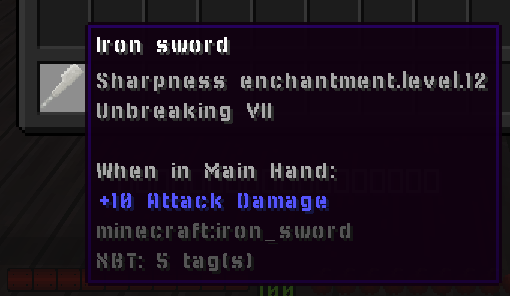
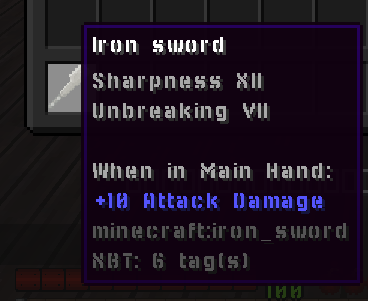
FORMAT_ENCHANTMENTS
- 信息:格式化你 lore 中的所有附魔
- 命令设置:
{slot}:目标栏位(-1 表示主手)
- 示例:
activators:
  activator0: # Activator ID, you can create as many activator on the activators list
    option: # Here goes an activator that is at least instance of player
    playerCommands:
    - FORMAT_ENCHANTMENTS %slot%
 ->
GIVE_MONEY
- 信息:给予玩家金钱
- 需要 Vault 插件
- 命令设置:
- amount:要给予的数额
- 示例:
activators:
  activator0: # Activator ID, you can create as many activator on the activators list
    option: # Here goes an activator that is at least instance of player
    playerCommands:
    - GIVE_MONEY amount:50.0
GRAVITY_DISABLE
- 信息:停止玩家的重力,使玩家不会向下“坠落”或向上移动。
- 无命令设置
- 示例:
activators:
  activator0: # Activator ID, you can create as many activator on the activators list
    option: # Here goes an activator that is at least instance of player
    playerCommands:
    - GRAVITY_DISABLE
    - DELAY 5
    - GRAVITY_ENABLE
GRAVITY_ENABLE
- 信息:重新启用玩家的重力,使玩家正常下落。
- 无命令设置
- 示例:
activators:
  activator0: # Activator ID, you can create as many activator on the activators list
    option: # Here goes an activator that is at least instance of player
    playerCommands:
    - GRAVITY_DISABLE
    - DELAY 5
    - GRAVITY_ENABLE
HEAD
- 信息:将你主手中的物品放入头部栏位。(如果物品带有“绑定诅咒”则无效)
- 无命令设置
- 示例:
activators:
  activator0: # Activator ID, you can create as many activator on the activators list
    option: # Here goes an activator that is at least instance of player
    playerCommands:
    - HEAD
JOBS_MONEY_BOOST
- 信息:临时增加获得的金钱。适用于 Jobs reborn
- 命令设置:
{multiplier}:倍率值{time}:加成的持续时间(以秒为单位)
- 示例:
activators:
  activator0: # Activator ID, you can create as many activator on the activators list
    option: # Here goes an activator that is at least instance of player
    playerCommands:
    - JOBS_MONEY_BOOST multiplier:2.0 time:10
倍率不会影响 Jobs 动作栏中显示的数值。此命令的倍率仅在 Jobs 插件决定增加所获得的金钱、经验和点数时才会生效。
如果多次执行,且每次加成的持续时间足够长,所有正在进行的加成都可以叠加。
JOBS_XP_BOOST
- 信息:临时倍增 Jobs 插件的经验获取。适用于 Jobs reborn
- 命令设置:
{multiplier}:经验倍率值(例如 2.0 表示双倍经验){time}:加成失效前的持续时间(以秒为单位)
- 示例:
activators:
  activator0: # Activator ID, you can create as many activator on the activators list
    option: # Here goes an activator that is at least instance of player
    playerCommands:
    - JOBS_XP_BOOST multiplier:2.0 time:10
倍率不会影响 Jobs 动作栏中显示的数值。此命令的倍率仅在 Jobs 插件决定增加所获得的金钱、经验和点数时才会生效。
如果多次执行,且每次加成的持续时间足够长,所有正在进行的加成都可以叠加。
此命令支持多个加成以乘法方式叠加。
LAUNCH
- 信息:发射一个自定义弹射物。参考
- 列表:
弹射物类型
* ARROW * DRAGONFIREBALL * EGG * ENDERPEARL * FIREBALL * LARGEFIREBALL * LINGENRINGPOTION * LLAMASPIT * SHULKERBULLET(仅适用于 1.12+) * SIZEDFIREBALL * SNOWBALL * TRIDENT * WITHERSKULL- 命令设置:
{projectile}:弹射物的类型,或 SCore 中的自定义弹射物 ID(参考)[angleRotationVertical]:(可选)(默认值 = 0)(单位为度)定义实体发射的方向[angleRotationHorizontal]:(可选)(默认值 = 0)(单位为度)定义实体发射的方向[velocity]:(可选)(默认值 = 1)自定义弹射物的速度(在 1.8 到 1.12 上也有效)[name]:(可选)给发射出的弹射物设置的自定义名称,例如用于稍后在条件中识别它(name:&cFire_ball)。[strictYaw]:(可选)(单位为度)发射的水平方向,用于代替玩家注视的方向(0= 南,90= 西,180= 北,-90= 东)。angleRotation...设置会叠加到该值上。[strictPitch]:(可选)(单位为度)发射的垂直方向,用于代替玩家注视的方向(0= 正前方,-90= 向上,90= 向下)。angleRotation...设置会叠加到该值上。- VERSION 它还会改变火球(FIREBALL、SIZEDFIREBALL、LARGEFIREBALL、DRAGONFIREBALL、WITHERSKULL)的速度:
velocity:2飞行速度为两倍,velocity:1保持原版速度。1.20.5 之前火球保持原版速度。
- VERSION 它还会改变火球(FIREBALL、SIZEDFIREBALL、LARGEFIREBALL、DRAGONFIREBALL、WITHERSKULL)的速度:
- 示例:
activators:
  activator0: # Activator ID, you can create as many activator on the activators list
    option: # Here goes an activator that is at least instance of player
    playerCommands:
    - LAUNCH projectile:My_Custom_Proj velocity:5
- 多重发射示例:
activators:
  activator0: # Activator ID, you can create as many activator on the activators list
    option: # Here goes an activator that is at least instance of player
    playerCommands:
    - LAUNCH projectile:WITHERSKULL
    - LAUNCH projectile:WITHERSKULL angleRotationVertical:20
    - LAUNCH projectile:WITHERSKULL angleRotationVertical:-20
- 示例:无论玩家向上还是向下看,始终笔直向前(水平)投掷,并使用带名称的弹射物:
activators:
  activator0:
    option: PLAYER_RIGHT_CLICK
    playerCommands:
    - LAUNCH projectile:SNOWBALL strictPitch:0 name:Frost_Ball
如果你在激活器 PLAYER_LAUNCH_PROJECTILE 中使用 LAUNCH 命令,并且该弹射物是由弓发射的,那么通过自定义 LAUNCH 命令发射的弹射物将保持相同的速度。
如果你使用 SHULKERBULLET 作为弹射物类型,它会选取施放者的光标作为目标。否则,它会以距离施放者最近的实体为目标。
当前问题:
- Shulker Bullets 无法在 1.9.4、1.10.2、1.11.2 中使用。1.12 及以上版本应该没有问题,只是需要创建一个 SCore 弹射物,才能让 Shulker Bullet 获得正确的飞行速度。
LEGGINGS
- 信息:将你主手中的物品放入护腿栏位。(如果物品带有“绑定诅咒”则无效)
- 无命令设置
- 示例:
activators:
  activator0: # Activator ID, you can create as many activator on the activators list
    option: # Here goes an activator that is at least instance of player
    playerCommands:
    - LEGGINGS
LOCATED_LAUNCH
- 信息:在指定位置发射弹射物
- 命令设置:
{projectileType}:弹射物的类型,或 SCore 中的自定义弹射物 ID(参考)[frontValue]:(可选)(默认值 = 0)正值 = 前,负值 = 后,前后位置。例如,如果你想让弹射物在你面朝方向 5 格远的地方生成,请使用较大的正值[rightValue]:(可选)(默认值 = 0)右 = 正值,负值 = 左,左右位置。例如,如果你想让弹射物在你的左侧生成,请使用较大的负值[yValue]:(可选)(默认值 = 0)弹射物在你的 Y 坐标上方多高的位置生成。[velocity]:(可选)(默认值 = 1)弹射物的飞行速度。将值设为 0 可使弹射物在生成后向下坠落。[angleRotationVertical]:(可选)(默认值 = 0)VERSION 你可以为弹射物添加垂直旋转(单位为度)[angleRotationHorizontal]:(可选)(默认值 = 0)VERSION 你可以为弹射物添加水平旋转(单位为度)
- 示例:
activators:
  activator0: # Activator ID, you can create as many activator on the activators list
    option: # Here goes an activator that is at least instance of player
    playerCommands:
    - LOCATED_LAUNCH projectile:ARROW frontValue:0 rightValue:0 yValue:0 velocity:1 angleRotationVertical:0 angleRotationHorizontal:0
MINECART_BOOST
- 信息:在你乘坐矿车时为你加速(效果接近驶上动力铁轨时)
- 命令设置:
{boost}:加速的速度
- 示例:
activators:
  activator0: # Activator ID, you can create as many activator on the activators list
    option: # Here goes an activator that is at least instance of player
    playerCommands:
    - MINECART_BOOST boost:10
MIX_HOTBAR
- 信息:打乱玩家的快捷栏
- 无命令设置
- 示例:
activators:
  activator0: # Activator ID, you can create as many activator on the activators list
    option: # Here goes an activator that is at least instance of player
    playerCommands:
    - MIX_HOTBAR
MODIFY_DURABILITY
- 修改指定栏位中指定物品的耐久度
- 命令设置:
{modification}:正值表示增加耐久度,负值表示减少耐久度{slot}:物品的栏位编号(-1 表示手持栏位)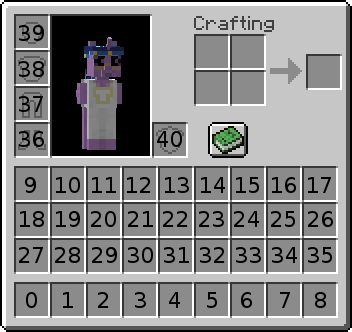
{supportUnbreaking}:(true 或 false)是否支持耐久附魔
- 示例:
activators:
  activator0: # Activator ID, you can create as many activator on the activators list
    option: # Here goes an activator that is at least instance of player
    playerCommands:
    - MODIFY_DURABILITY modification:-1 slot:%slot% supportUnbreaking:true
OPEN_CHEST
- 信息:在选定位置打开箱子或木桶
- 命令设置:
{world}:世界名称{x}:X 坐标{y}:Y 坐标{z}:Z 坐标[bypassProtections]:(可选)(默认值 = false)即使箱子受到保护,是否仍然打开
- 示例:
activators:
  activator0: # Activator ID, you can create as many activator on the activators list
    option: # Here goes an activator that is at least instance of player
    playerCommands:
    - OPENCHEST VanillaWorld 100 100 100
OPEN_ENDERCHEST
- 信息:为运行该激活器的玩家打开末影箱
- 无命令设置
- 示例:
activators:
  activator0: # Activator ID, you can create as many activator on the activators list
    option: # Here goes an activator that is at least instance of player
    playerCommands:
    - OPEN_ENDERCHEST
OPEN_WORKBENCH
- 信息:为运行该激活器的玩家打开工作台
- 无命令设置
- 示例:
activators:
  activator0: # Activator ID, you can create as many activator on the activators list
    option: # Here goes an activator that is at least instance of player
    playerCommands:
    - OPEN_WORKBENCH
OXYGEN
- 信息:给予目标氧气
- 命令设置:
{time}:你想给予的氧气持续时间(以 tick 为单位)
- 示例:
activators:
  activator0: # Activator ID, you can create as many activator on the activators list
    option: # Here goes an activator that is at least instance of player
    playerCommands:
    - OXYGEN time:200
PROJECTILE_CUSTOMDASH1
- 信息:类似于 CUSTOMDASH1,但 xyz 会被替换为距离你最近的弹射物的 xyz 坐标。
- 命令设置:
{fallDamage}:你是否会受到摔落伤害(如果你忘记设置 true 或 false,默认值为 false。若要受到摔落伤害,请将其设为 true)
- 示例:
activators:
  activator0: # Activator ID, you can create as many activator on the activators list
    option: # Here goes an activator that is at least instance of player
    playerCommands:
    - PROJECTILE_CUSTOMDASH1 fallDamage:false
REGAIN_FOOD
- 信息:给予你指定数量的饱食度/饱和度
- 命令设置:
{amount}:你想获得的饱和度点数。使用负值来减少饥饿点数
- 示例:
activators:
  activator0: # Activator ID, you can create as many activator on the activators list
    option: # Here goes an activator that is at least instance of player
    playerCommands:
    - REGAIN_FOOD amount:5
REGAIN_MAGIC
- 信息:给予玩家指定数值的指定 Ecoskills 魔法值。
- 命令设置:
{ecoSkillsMagicID}:Ecoskills 魔法的 ID。{amount}:要获得的数量。
- 示例:
activators:
  activator0: # Activator ID, you can create as many activator on the activators list
    option: # Here goes an activator that is at least instance of player
    playerCommands:
    - REGAIN_MAGIC ecoSkillsMagicID:mana amount:15
支持负值。
REGAIN_SATURATION
- 信息:给予你指定数量的饱和度
- 命令设置:
{amount}:你想给予的饱和度数量
- 示例:
activators:
  activator0: # Activator ID, you can create as many activator on the activators list
    option: # Here goes an activator that is at least instance of player
    playerCommands:
    - REGAIN_SATURATION amount:10
REMOVE_ENCHANTMENT
- 信息:移除某个栏位上的附魔
- 命令设置:
{slot}:要移除附魔的栏位(-1 表示手持栏位){enchantment}:要移除的附魔(ALL 表示所有附魔)
- 示例:
activators:
  activator0: # Activator ID, you can create as many activator on the activators list
    option: # Here goes an activator that is at least instance of player
    playerCommands:
    - REMOVE_ENCHANTMENT slot:-1 enchantment:ALL
REMOVE_LORE
- 信息:移除一行 lore
- 命令设置:
{slot}:要移除 lore 的栏位(-1 表示手持栏位){line}:你想移除的行
- 示例:
activators:
  activator0: # Activator ID, you can create as many activator on the activators list
    option: # Here goes an activator that is at least instance of player
    playerCommands:
    - REMOVE_LORE slot:1 line:5
REPLACE_BLOCK
- 信息:将玩家正在注视的方块替换为另一种方块
- 命令设置:
{material}:方块 ID(支持方块状态)
- 示例:
activators:
  activator0: # Activator ID, you can create as many activator on the activators list
    option: # Here goes an activator that is at least instance of player
    playerCommands:
    - REPLACE_BLOCK STONE_BRICKS
    - REPLACE_BLOCK WATER[LEVEL=0]
SEND_BLANK_MESSAGE
- 信息:向你发送一条空白消息
- 无命令设置
- 示例:
activators:
  activator0: # Activator ID, you can create as many activator on the activators list
    option: # Here goes an activator that is at least instance of player
    playerCommands:
    - SEND_BLANK_MESSAGE
SEND_MESSAGE
- 信息:向你发送一条消息
- 支持 MiniMessage
- 命令设置:
{message}:你想发送的消息
- 示例:
activators:
  activator0: # Activator ID, you can create as many activator on the activators list
    playerCommands:
    - SEND_MESSAGE text:&fThis is a somewhat random text.
    - SEND_MESSAGE text:<yellow>Hello </yellow><blue>World</blue><yellow>!</yellow> # MiniMessage Suported, but dont use MiniMessage + vanilla at the same time
SEND_CENTERED_MESSAGE
- 信息:向你发送一条在聊天中居中的消息
- 支持 MiniMessage
- 命令设置:
{message}:你想发送的消息
- 示例:
activators:
  activator0: # Activator ID, you can create as many activator on the activators list
    option: # Here goes an activator that is at least instance of player
    playerCommands:
    - SEND_CENTERED_MESSAGE text:&fThis is a somewhat random text.
    - SEND_CENTERED_MESSAGE text:<yellow>Hello </yellow><blue>World</blue><yellow>!</yellow> # MiniMessage Suported, but dont use MiniMessage + vanilla at the same time
SET_ARMOR_TRIM
- 信息:为指定栏位设置带有指定图案的盔甲纹饰
- 命令设置:
{slot}:应用命令的栏位(栏位 -1 表示主手){pattern}:纹饰的图案(如果为 'null' 或 'remove',将移除当前图案)。TrimPattern 列表{patternMaterial}:图案的材料。TrimMaterial 列表
- 示例:
activators:
  activator0: # Activator ID, you can create as many activator on the activators list
    option: # Here goes an activator that is at least instance of player
    playerCommands:
    - SET_ARMOR_TRIM slot:38 pattern:vex patternMaterial:netherite
    - SET_ARMOR_TRIM slot:38 pattern:null #to clear the armor trim
SET_BLOCK
- 信息:在玩家所指向的方块上放置一个方块
- 命令设置:
{blockface}:你可以指定或不指定 blockFace,例如强制在上方放置。BlockFaces{material}:方块 ID(支持方块状态){bypassProtection}:即使玩家没有权限,是否仍然放置该方块[whitelistCurrentBlock]:(可选)(默认值 = 可在所有类型的方块上放置)当前方块必须匹配才会被替换的方块列表- 示例:
- AIR, WATER
- !STONE, !COBBLESTONE
- 示例:
activators:
  activator0: # Activator ID, you can create as many activator on the activators list
    option: # Here goes an activator that is at least instance of player
    playerCommands:
    - SET_BLOCK blockface:UP material:OAK_WOOD
    - SET_BLOCK material:FURNACE[LIT=TRUE]
    - SET_BLOCK material:GOLD_BLOCK whitelistCurrentBlock:SAND,DIRT
SET_BLOCK_POS
- 信息:在指定位置放置一个方块
- 命令设置:
{x}:X 坐标{y}:Y 坐标{z}:Z 坐标{material}:方块的材质[bypassProtection]:(可选)(默认值 = false)是否绕过区域、领地、岛屿保护[replace]:(可选)(默认值 = true)如果该位置已有方块,是否替换它[whitelistCurrentBlock]:(可选)(默认值 = 可在所有类型的方块上放置)当前方块必须匹配才会被替换的方块列表- 示例:
- AIR, WATER
- !STONE, !COBBLESTONE
- 示例:
activators:
  activator0: # Activator ID, you can create as many activator on the activators list
    option: # Here goes an activator that is at least instance of player
    playerCommands:
    - SET_BLOCK_POS x:0 y:0 z:0 material:STONE bypassProtection:false replace:true
    - SET_BLOCK_POS x:0 y:0 z:0 material:GOLD_BLOCK whitelistCurrentBlock:SAND,DIRT
SET_EQUIPPABLE_MODEL
- 信息:设置指定栏位中物品的 equippable 模型数据
- 命令设置:
{slot}:目标物品所在的栏位编号{model}:你希望分配给物品的装备模型名称
- 示例:
activators:
  activator0: # Activator ID, you can create as many activator on the activators list
    option: # Here goes an activator that is at least instance of player
    playerCommands:
    - SET_EQUIPPABLE_MODEL slot:-1 model:minecraft:diamond
SET_EXECUTABLE_BLOCK
- 信息:类似 Setblock,但用于 Executable Blocks。(必须安装 EXECUTABLE BLOCKS)
- 命令设置:
{id}:你要放置的 executable block 的 ID{x}:X 坐标{y}:Y 坐标{z}:Z 坐标{world}:世界名称[replace]:(可选)(默认值 = true)是否替换指定坐标上已有的方块[bypassProtection]:(可选)(默认值 = false)是否绕过 worldguard 等保护[ownerUUID]:(可选)(默认值 = 无所有者)该 executable block 的所有者的 uuid
- 示例:
activators:
  activator0: # Activator ID, you can create as many activator on the activators list
    option: # Here goes an activator that is at least instance of player
    playerCommands:
    - SET_EXECUTABLE_BLOCK id:Mithril_Ore x:%block_x_int% y:%block_y_int% z:%block_z_int% world:%block_world% replace:false bypassProtection:true ownerUUID:%player_uuid%
SET_ITEM_COLOR
- 信息:为物品设置指定颜色(可染色的物品,如皮革盔甲 / 烟火之星)
- 命令设置:
{slot}:应用的栏位。(-1 表示主手)
{color}:颜色的数值。取色器网站- 示例:
activators:
  activator0: # Activator ID, you can create as many activator on the activators list
    option: # Here goes an activator that is at least instance of player
    playerCommands:
    - SET_ITEM_COLOR slot:1 color:0
SET_ITEM_ATTRIBUTE
- 信息:为物品设置一个属性。
- 命令设置:
{slot}:应用的栏位。(-1 表示主手){attribute}:你想添加的属性。属性{value}:运算的值{equipmentSlot}:属性所在的栏位 EquipmentSlots
- 示例:
activators:
  activator0: # Activator ID, you can create as many activator on the activators list
    option: # Here goes an activator that is at least instance of player
    playerCommands:
    - SET_ITEM_ATTRIBUTE slot:%slot% attribute:GENERIC_ARMOR value:10 equipmentSlot:CHEST
SET_ITEM_COOLDOWN
- 给予玩家/目标某个物品的冷却
- 命令设置:
{material or group}:材质的类型或分组。分组的更多信息{cooldown}:冷却时间(以秒为单位)
- 示例:
activators:
  activator0: # Activator ID, you can create as many activator on the activators list
    option: # Here goes an activator that is at least instance of player
    playerCommands:
    - SET_ITEM_COOLDOWN material:ENDER_PEARL cooldown:10
activators:
  activator0: # Activator ID, you can create as many activator on the activators list
    option: # Here goes an activator that is at least instance of player
    playerCommands:
    - SET_ITEM_COOLDOWN group:my_cooldown_group cooldown:10
SET_ITEM_CUSTOM_MODEL_DATA
- 信息:为指定物品设置指定的 custom model data
- 命令设置:
{slot}:应用的栏位。(-1 表示主手){customModelData}:customModelData 的值
- 示例:
activators:
  activator0: # Activator ID, you can create as many activator on the activators list
    option: # Here goes an activator that is at least instance of player
    playerCommands:
    - SET_ITEM_CUSTOM_MODEL_DATA slot:10 customModelData:10
SET_ITEM_LORE
- 信息:设置一行 lore
- 命令设置:
{slot}:栏位编号(-1 表示主手)
{line}:如果你想设置第一行 lore,请输入 1{text}:新的行文本- 示例:
activators:
  activator0: # Activator ID, you can create as many activator on the activators list
    option: # Here goes an activator that is at least instance of player
    playerCommands:
    - SET_ITEM_LORE slot:%slot% line:3 text:&6LEGENDARY SWORD
SET_ITEM_MATERIAL
VERSION
- 将物品的材质替换为另一种材质,同时保留目标物品的 nbt
- 命令设置:
{slot}:栏位编号(-1 表示主手)
{material}:你希望物品变成的材质- 示例:
activators:
  activator0: # Activator ID, you can create as many activator on the activators list
    option: # Here goes an activator that is at least instance of player
    playerCommands:
    - SET_ITEM_MATERIAL slot:10 material:DIAMOND_HOE
SET_ITEM_MODEL
- 信息:为指定栏位中的物品设置自定义模型
- 命令设置:
{slot}:应用的栏位。(-1 表示主手){model}:你想应用到目标物品的模型值
- 示例:
activators:
  activator0: # Activator ID, you can create as many activator on the activators list
    option: # Here goes an activator that is at least instance of player
    playerCommands:
    - SET_ITEM_MODEL slot:-1 model:minecraft:stone
SET_ITEM_NAME
- 信息:为指定栏位中的物品设置自定义名称
- 命令设置:
{slot}:应用的栏位。(-1 表示主手){name}:物品的新名称
- 示例:
activators:
  activator0: # Activator ID, you can create as many activator on the activators list
    option: # Here goes an activator that is at least instance of player
    playerCommands:
    - SET_ITEM_NAME slot:%slot% name:&eThis is the new name of the item
SET_ITEM_POTIONCOLOR
- 信息:为指定栏位中的药水物品设置自定义颜色
- 命令设置:
{slot}:应用的栏位。(-1 表示主手){color}:你想应用的颜色。关于颜色,请前往https://www.tydac.ch/color/并获取你所选颜色的MapInfo Color值。
- 示例:
activators:
  activator0: # Activator ID, you can create as many activator on the activators list
    option: # Here goes an activator that is at least instance of player
    playerCommands:
    - SET_ITEM_POTIONCOLOR slot:%slot% color:10944256
SET_ITEM_TOOLTIPSTYLE
- 信息:设置栏位中物品的自定义 tooltip 样式。
- 命令设置:
{slot}:应用的栏位。(-1 表示主手){tooltipModel}:(默认值:namespace:id)tooltip 的 id。
- 示例:
activators:
  activator0: # Activator ID, you can create as many activator on the activators list
    option: # Here goes an activator that is at least instance of player
    playerCommands:
    - SET_ITEM_TOOLTIPSTYLE slot:-1 tooltipModel:namespace:id
SET_PLAYER_TIME
- 信息:设置玩家的时间,而不影响服务器端的时间。
- 命令设置:
{time}:时间值。输入-1可将玩家的时间重置为依赖服务器端时间。{relative}:(默认值:false)如果不为 true,将按字面意义把用户视角的时间设置为该值。如果为 true,则会取世界当前时间并加上所提供的值,作为你当前视角的时间。
- 示例:
activators:
  activator0: # Activator ID, you can create as many activator on the activators list
    option: # Here goes an activator that is at least instance of player
    playerCommands:
    - SET_PLAYER_TIME time:6000 relative:false
SET_PLAYER_WEATHER
- 信息:设置玩家的天气,而不影响服务器端的时间。
- 命令设置:
{weather The time value}:设置玩家视角中的天气- 选项:
- RESET:恢复为服务器端的天气
- DOWNFALL:根据生物群系下雨或下雪
- CLEAR:晴天,有云但无降水。
- 选项:
- 示例:
activators:
  activator0: # Activator ID, you can create as many activator on the activators list
    option: # Here goes an activator that is at least instance of player
    playerCommands:
    - SET_PLAYER_WEATHER weather:CLEAR
SET_TEMP_BLOCK_POS
- 信息:设置一个临时方块
- 命令设置:
{x}:X 坐标{y}:Y 坐标{z}:Z 坐标{world}:世界名称{material}:方块 ID{time}:时间(以 tick 为单位)[bypassProtection]:(可选)(默认值 = false)是否忽略第三方干预[whitelistCurrentBlock]:(可选)(默认值 = 可在所有类型的方块上放置)需要留意的方块列表- 示例:
- AIR, WATER
- !STONE, !COBBLESTONE
activators:
  activator0: # Activator ID, you can create as many activator on the activators list
    option: # Here goes an activator that is at least instance of player
    playerCommands:
    - SET_TEMP_BLOCK_POS x:%entity_x% y:%entity_y% z:%entity_z% world:%entity_world% material:BEDROCK time:40 bypassProtection:true whitelistCurrentBlock:!AIR,!WATER
它不会替换带有额外数据(物品栏、朝向等)的方块
SPAWN_ENTITY_ON_CURSOR
- 信息:在你的光标位置生成实体
- 你可以指定一个 EntityType
- 或一个实体定义,例如:
{HasVisualFire:1b,id:"minecraft:bee"}(1.21.+) - 或一个 MythicMob ID
- 命令设置:
{entity}:实体的规格{amount}:在该位置生成的生物数量[maxRange]:(可选)(默认值 = 200)生成的最大范围
- 示例:
activators:
  activator0: # Activator ID, you can create as many activator on the activators list
    option: # Here goes an activator that is at least instance of player
    playerCommands:
    - SPAWN_ENTITY_ON_CURSOR entity:CREEPER amount:1
# With EntitySnapshot
- SPAWN_ENTITY_ON_CURSOR entity:{HasVisualFire:1b,id:"minecraft:bee"} amount:1

# With MythicMob ID
- SPAWN_ENTITY_ON_CURSOR entity:MyCustomBossID amount:1
SUDO
- 信息:强制你执行一条命令
- 命令设置:
{command}:要执行的命令
- 示例:
activators:
  activator0: # Activator ID, you can create as many activator on the activators list
    option: # Here goes an activator that is at least instance of player
    playerCommands:
    - SUDO sit
    - SUDO say hi
SUDO_OP
- 信息:给予玩家 OP,以该玩家身份执行 SUDO,然后取消其 OP
- 额外信息:在拥有 OP 期间,玩家只能执行 SUDOOP 之后指定的命令,玩家拥有 OP 时所有其他命令都会被阻止,即使服务器崩溃也没有问题。玩家重新连接时会被取消 OP。
- 命令设置:
{command}:以 OP 身份执行的命令
- 示例:
activators:
  activator0: # Activator ID, you can create as many activator on the activators list
    option: # Here goes an activator that is at least instance of player
    playerCommands:
    - SUDO_OP summon zombie
    - SUDO_OP fly
    - SUDO_OP god
    - SUDO_OP /replacenear 20 tnt
不建议大量使用此命令。正如本页顶部所述,如果你想执行原版命令,请使用 execute 命令(详见 FAQ 中的 如何使用原版命令)。
只有在确实没有其他选择时才使用 SUDOOP,它应该是你的最后手段,而不是首选。
SWAP_HAND
- 信息:将当前物品与你副手中的物品互换
- 无命令设置
- 示例:
activators:
  activator0: # Activator ID, you can create as many activator on the activators list
    option: # Here goes an activator that is at least instance of player
    playerCommands:
    - SWAP_HAND
TRANSFER_ITEM
- 信息:按栏位互换物品栏中的 2 个物品
- 命令设置:
{slot of launcher}:第 1 个栏位的目标栏位{slot of receiver}:第 2 个栏位的目标栏位
[boolean drop]:(可选)(默认值 = false)互换期间发射者的栏位是否会被丢弃
XP_BOOST
- 信息:在一段时间内提升经验获取。
- 命令设置:
{multiplier}:经验倍率值{timeinsecs}:持续时间(以秒为单位)
- 示例:
activators:
  activator0: # Activator ID, you can create as many activator on the activators list
    option: # Here goes an activator that is at least instance of player
    playerCommands:
    - XP_BOOST 2 10
请小心!此命令可以叠加,因此如果你多次执行此命令,且两次之间的时间不足以让上一次加成消失,你将获得越来越高的倍率。\
- XP_BOOST 2 5
- DELAY 1
- XP_BOOST 2 5
这意味着经验将按以下顺序被提升:
- 1 秒:x2
- 4 秒:x4
- 1 秒:x2
立即试用
复制到 ExecutableItems 中并重载
摘自本页。将其粘贴到配置中,运行插件的重载命令,你就有了一个可以直接编辑的可用起点。
activators:
  activator0: # Activator ID, you can create as many activator on the activators list
    option: # Here goes an activator that is at least instance of player
    playerCommands:
    - ABSORPTION amount:5 time:200 # Gives the player absorption
  activator1: # Activator ID, you can create as many activator on the activators list
    option: # Here goes an activator that is at least instance of target
    targetCommands:
- ABSORPTION amount:5 time:200 # Gives the target absorption本页使用的插件
ExecutableItems带有能力、激活器和命令的自定义物品,无需写代码。
- 5.0/5,共 10 条评价
- 当前有 3.1K 个服务器正在运行(bStats)
- 在 SPlugins 上已有 103 次下载
€19.99
一次性付款,终身更新