
本页面借助 AI 从英文翻译而来。改进此翻译或阅读英文原文。
混合命令(玩家与实体)
这些自定义命令既适用于玩家,也适用于实体
因此可用于:
- playerCommands
- targetCommands
- entityCommands
- ownerCommands
- ...
按字母顺序排列
ADD_TEMPORARY_ATTRIBUTE
- 说明:为玩家/实体添加临时属性
- 命令设置:
- 示例:
ADD_TEMPORARY_ATTRIBUTE GRAVITY 2 ADD_NUMBER 5ADD_TEMPORARY_ATTRIBUTE attribute:SCALE amount:1.2 operation:ADD_NUMBER timeinticks:120
ALL_PLAYERS
- 说明:以所有玩家为目标。
- 命令设置:
{command}:将要执行的命令
- 示例:
activators:
  activator0: # Activator ID, you can create as many activators on the activators list
    option: # Here goes an activator that is at least instance of player
    playerCommands:
    - ALL_PLAYERS SEND_MESSAGE Hello %parseother_`{%around_target%}`_`{player_name}`%
  activator1: # Activator ID, you can create as many activators on the activators list
    option: # Here goes an activator that is at least instance of target
    targetCommands:
    - ALL_PLAYERS SEND_MESSAGE %target% has been hit by %player%
  activator2: # Activator ID, you can create as many activators on the activators list
    option: # Here goes an activator that is at least instance of entity
    entityCommands:
    - ALL_PLAYERS SEND_MESSAGE %entity% has been hit by %player%
运行多条命令:给所有玩家随机发放一个物品,每位玩家得到的物品不会相同。
activators:
  activator0: # Activator ID, you can create as many activators on the activators list
    option: # Here goes an activator that is at least instance of player
    playerCommands:
    - ALL_PLAYERS RANDOM_RUN selectionCount:1 <+> ei give %around_target% candy1 1 <+> ei give %around_target% candy2 1 <+> ei give %around_target% candy3 1 <+> RANDOM_END
  activator1: # Activator ID, you can create as many activators on the activators list
    option: # Here goes an activator that is at least instance of target
    targetCommands:
    - ALL_PLAYERS RANDOM_RUN selectionCount:1 <+> ei give %around_target% candy1 1 <+> ei give %around_target% candy2 1 <+> ei give %around_target% candy3 1 <+> RANDOM_END
  activator2: # Activator ID, you can create as many activators on the activators list
    option: # Here goes an activator that is at least instance of entity
    entityCommands:
    - ALL_PLAYERS RANDOM_RUN selectionCount:1 <+> ei give %around_target% candy1 1 <+> ei give %around_target% candy2 1 <+> ei give %around_target% candy3 1 <+> RANDOM_END
ALL_MOBS
- 说明:以所有玩家为目标。
- 命令设置:
{command(s)}:将要执行的命令
- 示例:
activators:
  activator0: # Activator ID, you can create as many activators on the activators list
    option: # Here goes an activator that is at least instance of player
    playerCommands:
    - ALL_MOBS DAMAGE 5
    - ALL_MOBS BLACKLIST(ZOMBIE,ARMORSTAND) DAMAGE 20
    - ALL_MOBS WHITELIST(ZOMBIE) DAMAGE 20
  activator1: # Activator ID, you can create as many activators on the activators list
    option: # Here goes an activator that is at least instance of target
    targetCommands:
    - ALL_MOBS DAMAGE 5
    - ALL_MOBS BLACKLIST(ZOMBIE,ARMORSTAND) DAMAGE 20
    - ALL_MOBS WHITELIST(ZOMBIE) DAMAGE 20
  activator2: # Activator ID, you can create as many activators on the activators list
    option: # Here goes an activator that is at least instance of entity
    entityCommands:
    - ALL_MOBS DAMAGE 5
    - ALL_MOBS BLACKLIST(ZOMBIE,ARMORSTAND) DAMAGE 20
    - ALL_MOBS WHITELIST(ZOMBIE) DAMAGE 20
运行多条 playerCommands:
activators:
  activator0: # Activator ID, you can create as many activators on the activators list
    option: # Here goes an activator that is at least instance of player
    playerCommands:
    - ALL_MOBS DAMAGE 5 <+> effect give %around_target_uuid% strength 10 1
  activator1: # Activator ID, you can create as many activators on the activators list
    option: # Here goes an activator that is at least instance of target
    targetCommands:
    - ALL_MOBS DAMAGE 5 <+> effect give %around_target_uuid% strength 10 1
  activator2: # Activator ID, you can create as many activators on the activators list
    option: # Here goes an activator that is at least instance of entity
    entityCommands:
    - ALL_MOBS DAMAGE 5 <+> effect give %around_target_uuid% strength 10 1
支持黑名单和白名单
AROUND
- 说明:以特定半径内的玩家为目标,并让他们运行命令
- 命令设置:
{distance}:命令选取玩家的半径范围(默认 3){displayMsgIfNoPlayer}:(true 或 false)当物品是否成功选中玩家时,是否通知使用者(默认 true){throughBlocks}:是否影响位于方块后面的玩家(默认 true){safeDistance}:如果目标与发起者之间的距离小于或等于 safeDistance 的值,则该目标不会受到影响。(默认 0){offsetYaw}:你希望偏移所朝向的 yaw 方向(与原点的 yaw 值无关){offsetPitch}:你希望偏移所朝向的 pitch 方向(与原点的 yaw 值无关){offsetDistance}:在计算出 offsetYaw 和 offsetPitch 之后,使用该值将 AROUND 命令的位置/中心点从原点的 xyz 坐标处移开。{limit}:可以受影响的目标数量{sort}:对 limit 选项很有用。- NEAREST:选择距离原点最近的实体。
- RANDOM:在命令范围内随机选择任意实体。
{regionCheck}:true/false。如果为 true,AROUND 命令会检查目标是否位于野外或施法者的领地内(以 GriefPrevention 插件为准)(之后将更新为支持其他领地插件的检查){commands}:将对目标玩家执行的命令。
你可以添加多条命令!请使用分隔符 <+>
示例:SEND_MESSAGE &cYou will be damaged in 5 seconds <+> DELAY 5 <+> DAMAGE 5
**占位符:**占位符与玩家占位符相同,但需要将 "player" 替换为 "around_target"
示例:%around_target%、%around_target_uuid%
目标数量:%around_target_count% 返回命令所选中的玩家数量。每个目标得到的数值相同,它统计的是经过 distance、safeDistance、throughBlocks、regionCheck 和 limit 筛选后保留的目标。对每个目标进行检查的 CONDITIONS(...) 不计算在内。它支持 +N / -N 简写:%around_target_count%-1。
示例:AROUND distance:10 displayMsgIfNoPlayer:false SEND_MESSAGE &eYou are one of the %around_target_count% players hit !
- 示例:
在 20 格半径内的玩家处召唤闪电
activators:
  activator0: # Activator ID, you can create as many activator on the activators list
    option: # Here goes an activator that is at least instance of player
    playerCommands:
    - AROUND distance:20 displayMsgIfNoPlayer:false execute at %around_target% run summon lightning_bolt
向距离在 5 到 10 格之间的玩家发送消息
activators:
  activator0: # Activator ID, you can create as many activator on the activators list
    option: # Here goes an activator that is at least instance of player
    playerCommands:
    - AROUND distance:10 displayMsgIfNoPlayer:true throughBlocks:true safeDistance:5 SENDMESSAGE &eIt is a test !
你可以将 AROUND 与以下命令嵌套:AROUND、IF、NEAREST、ALL_PLAYERS
如果这样做,分隔符和占位符会随嵌套层级而变化。
基础命令分隔符:<+>
第一层嵌套命令:<+::step1>
... :<+::step2>;,<+::step3>,...
基础占位符:%around_target%
第一层嵌套命令:%around_target::step1%
... :%around_target::step2%、%around_target::step3%,...
示例:
activators:
  activator0: # Activator ID, you can create as many activator on the activators list
    option: # Here goes an activator that is at least instance of player
    playerCommands:
    - AROUND distance:5 displayMsgIfNoPlayer:false say &a(0)&e%around_target% <+> DELAY 3 <+> AROUND distance:5 displayMsgIfNoPlayer:false say &a(1)&e%around_target::step1% <+::step1> DELAY 3 <+::step1> AROUND distance:5 displayMsgIfNoPlayer:false say &a(2)&e%around_target::step2%
activators:
  activator0: # Activator ID, you can create as many activator on the activators list
    option: # Here goes an activator that is at least instance of player
    playerCommands:
    - AROUND say &a(0)&e%around_target% <+> DELAY 3 <+> NEAREST 10 say &a(1)&e%around_target::step1%
activators:
  activator0: # Activator ID, you can create as many activator on the activators list
    option: # Here goes an activator that is at least instance of player
    playerCommands:
    - AROUND distance:10 throughBlocks:false displayMsgIfNoPlayer:false say &a(0)&e%around_target% <+> DELAY 3 <+> AROUND distance:5 displayMsgIfNoPlayer:false say &a(1)&e%around_target::step1% and x &c%around_target_x::step1% <+::step1> IF %around_target_x::step1%>10 say &aThe target &e%around_target_x::step2% <+::step2> effect give %around_target::step2% slowness 20
你可以添加自定义占位符条件来调整被选中的玩家
格式:AROUND <settings> CONDITIONS(<conditions>) <command>
 \<settings> 是命令设置

 \<conditions> 是条件
条件格式:CONDITIONS(%::<my_placeholder_name>::%<comparator><value>)
  \<my\_placeholder\_name> 是占位符的名称

  \<comparator> 比较运算符:"`<`"、"`<=`"、"`=`"、"`>`"、"`>=`"

  \<value> 是值
你可以使用分隔符 "&&" 添加多个条件
- 示例:
activators:
  activator0: # Activator ID, you can create as many activator on the activators list
    option: # Here goes an activator that is at least instance of player
    playerCommands:
    - 'AROUND distance:10 CONDITIONS(%::player_health::%>10&&%::player_name::%=2Ssomar) SEND_MESSAGE &eclick'
请注意,CONDITIONS() 部分会使用被 AROUND 命令选中的玩家来解析其中的占位符。因此,上面的占位符实际执行的是:检查目标的生命值是否大于 10,并且被 AROUND 命令选中的该玩家名称是否为 "2Ssomar"
activators:
  activator0: # Activator ID, you can create as many activator on the activators list
    option: # Here goes an activator that is at least instance of player
    playerCommands:
    - AROUND distance:10 displayMsgIfNoPlayer:false CONDITIONS(%::parseother_`{%player%}`_`{betterteams_name}`::%!=%::betterteams_name::%) effect give %around_target% weakness 10 10 true
activators:
  activator0: # Activator ID, you can create as many activator on the activators list
    option: # Here goes an activator that is at least instance of player
    playerCommands:
    - 'AROUND distance:2 CONDITIONS(%::player_name::%!=%player%) DAMAGE 15'
来自 ExecutableItems、ExecutableBlocks 等插件的占位符,不会使用受 AROUND 命令影响的玩家来解析。
例如,在 ExecutableBlocks 中,CONDITIONS(%var_faction%=%::factionsuuid_faction_name::%) 的作用是检查方块的 factions 变量值是否等于被选中玩家的派系
占位符来源:PlaceholderAPI)
BACK_DASH
- 说明:将玩家/目标朝其面向方向的反方向发射出去**(你无法在空中被发射)**
- 命令设置:
{amount}:发射力度的数值
- 示例:
activators:
  activator0: # Activator ID, you can create as many activators on the activators list
    option: # Here goes an activator that is at least instance of player
    playerCommands:
    - BACK_DASH 5
  activator1: # Activator ID, you can create as many activators on the activators list
    option: # Here goes an activator that is at least instance of target
    targetCommands:
    - BACK_DASH 5
  activator2: # Activator ID, you can create as many activators on the activators list
    option: # Here goes an activator that is at least instance of entity
    entityCommands:
    - BACK_DASH 5
BURN
- 说明:点燃玩家/目标
- 命令设置:
{timeinsecs}:燃烧时间(秒)- 示例:
activators:
  activator0: # Activator ID, you can create as many activators on the activators list
    option: # Here goes an activator that is at least instance of player
    playerCommands:
    - BURN 200
  activator1: # Activator ID, you can create as many activators on the activators list
    option: # Here goes an activator that is at least instance of target
    targetCommands:
    - BURN 200
  activator2: # Activator ID, you can create as many activators on the activators list
    option: # Here goes an activator that is at least instance of entity
    entityCommands:
    - BURN 200
CONSOLE_MESSAGE
- 说明:向控制台发送消息
- 命令设置:
{text}:发送到控制台的文本
- 示例:
activators:
  activator0: # Activator ID, you can create as many activators on the activators list
    option: # Here goes an activator that is at least instance of player
    playerCommands:
    - CONSOLE_MESSAGE This is a debug message sent to the %player%
  activator1: # Activator ID, you can create as many activators on the activators list
    option: # Here goes an activator that is at least instance of target
    targetCommands:
    - CONSOLE_MESSAGE This is a debug message sent to the %player% triggered by %target%
  activator2: # Activator ID, you can create as many activators on the activators list
    option: # Here goes an activator that is at least instance of entity
    entityCommands:
    - CONSOLE_MESSAGE This is a debug message sent to the %player% triggered by %entity%
COPY_EFFECTS
- 说明:复制目标的效果
- 命令设置:
[limitDuration]:(可选)(默认 = 无限制)例如目标拥有 3 分钟的中毒效果,如果你将其限制为 5 秒,那么你只会获得 5 秒的中毒效果
- 示例:
activators:
  activator0: # Activator ID, you can create as many activators on the activators list
    option: # Here goes an activator that is at least instance of player
    playerCommands:
    - COPY_EFFECTS 5 # Using this will copy the player's own effects
  activator1: # Activator ID, you can create as many activators on the activators list
    option: # Here goes an activator that is at least instance of target
    targetCommands:
    - COPY_EFFECTS 5 # Using this will copy the target effects into the player
  activator2: # Activator ID, you can create as many activators on the activators list
    option: # Here goes an activator that is at least instance of entity
    entityCommands:
    - COPY_EFFECTS 5 # Using this will copy the entity effects into the player
CUSTOMDASH1
- 说明:将你发射到指定位置
- 命令设置:
{x}:X 坐标{y}:Y 坐标{z}:Z 坐标{fallDamage}:true 或 false。玩家被发射后是否会受到摔落伤害。
- 示例:
activators:
  activator0: # Activator ID, you can create as many activators on the activators list
    option: # Here goes an activator that is at least instance of player
    playerCommands:
    - CUSTOMDASH1 %player_x% %player_y%+5 %player_z% true # This will dash up the player
  activator1: # Activator ID, you can create as many activators on the activators list
    option: # Here goes an activator that is at least instance of target
    targetCommands:
    - CUSTOMDASH1 %target_x% %target_y%+5 %target_z% true # This will dash up the target
  activator2: # Activator ID, you can create as many activators on the activators list
    option: # Here goes an activator that is at least instance of entity
    entityCommands:
    - CUSTOMDASH1 %entity_x% %entity_y% %entity_z% true # This will dash up the entity
如果你的激活器涉及两种类型的目标,则可以这样做
- 示例 1 | 玩家 - 实体实例 | 让玩家向实体冲刺
activators:
  activator0: # Activator ID, you can create as many activators on the activators list
    option: # Activator instance of player and entity
    playerCommands:
    - CUSTOMDASH1 %entity_x% %entity_y% %entity_z% true
    entityCommands: []
- 示例 2 | 玩家 - 实体实例 | 让实体向玩家冲刺
activators:
  activator0: # Activator ID, you can create as many activators on the activators list
    option: # Activator instance of player and entity
    playerCommands: []
    entityCommands:
    - CUSTOMDASH1 %player_x% %player_y% %player_z% true
- 示例 3 | 玩家 - 方块实例 | 让玩家向方块冲刺
activators:
  activator0: # Activator ID, you can create as many activators on the activators list
    option: # Activator instance of player and block
    playerCommands:
    - CUSTOMDASH1 %block_x% %block_y% %block_z% true
    blockCommands: []
你可以通过多次运行该命令来增加力度(但不能在同一个 tick 内运行,必须在时间上错开,否则没有意义,因为这样会让玩家从同一位置向该位置冲刺),示例:
- 手动多次运行
activators:
  activator0: # Activator ID, you can create as many activators on the activators list
    option: # Here goes an activator that is at least instance of player
    playerCommands:
    - CUSTOMDASH1 %player_x% %player_y%+5 %player_z% true # This will dash up the player
    - DELAYTICK 1
    - CUSTOMDASH1 %player_x% %player_y%+5 %player_z% true # This will dash up the player
    - DELAYTICK 1
    - CUSTOMDASH1 %player_x% %player_y%+5 %player_z% true # This will dash up the player
- 使用 LOOP START 实用命令
activators:
  activator0: # Activator ID, you can create as many activators on the activators list
    option: # Here goes an activator that is at least instance of player
    playerCommands:
    - 'LOOP START: 3'
    - CUSTOMDASH1 %player_x% %player_y%+5 %player_z% true # This will dash up the player
    - DELAYTICK 1
    - LOOP END
CUSTOMDASH2
- 说明:将你从指定位置向远处发射
- 命令设置:
{x}:X 坐标{y}:Y 坐标{z}:Z 坐标{strength}:冲刺力度
- 示例:
activators:
  activator0: # Activator ID, you can create as many activators on the activators list
    option: # Here goes an activator that is at least instance of player
    playerCommands:
    - CUSTOMDASH2 %player_x% %player_y%+5 %player_z% 5 # This will dash down the player with strength 5
  activator1: # Activator ID, you can create as many activators on the activators list
    option: # Here goes an activator that is at least instance of target
    targetCommands:
    - CUSTOMDASH2 %target_x% %target_y%+5 %target_z% 5 # This will dash down the target with strength 5
  activator2: # Activator ID, you can create as many activators on the activators list
    option: # Here goes an activator that is at least instance of entity
    entityCommands:
    - CUSTOMDASH2 %entity_x% %entity_y% %entity_z% 5 # This will dash down the entity with strength 5
如果你的激活器涉及两种类型的目标,则可以这样做
- 示例 1 | 玩家 - 实体实例 | 让玩家远离实体冲刺
activators:
  activator0: # Activator ID, you can create as many activators on the activators list
    option: # Activator instance of player and entity
    playerCommands:
    - CUSTOMDASH1 %entity_x% %entity_y% %entity_z% 5
    entityCommands: []
- 示例 2 | 玩家 - 实体实例 | 让实体远离玩家冲刺
activators:
  activator0: # Activator ID, you can create as many activators on the activators list
    option: # Activator instance of player and entity
    playerCommands: []
    entityCommands:
    - CUSTOMDASH1 %player_x% %player_y% %player_z% 5
- 示例 3 | 玩家 - 方块实例 | 让玩家远离方块冲刺
activators:
  activator0: # Activator ID, you can create as many activators on the activators list
    option: # Activator instance of player and block
    playerCommands:
    - CUSTOMDASH1 %block_x% %block_y% %block_z% 5
    blockCommands: []
CUSTOMDASH3
- 说明:让目标按照指定的数学函数冲刺
- 命令设置:
{function}:要遵循的数学函数。函数计算器网站{max x value}:函数的最大 x 值{front z}:冲刺方向是向前还是向后
- 示例:
activators:
  activator0: # Activator ID, you can create as many activators on the activators list
    option: # Here goes an activator that is at least instance of player
    playerCommands:
    - CUSTOMDASH3 cosx 10 true
  activator1: # Activator ID, you can create as many activators on the activators list
    option: # Here goes an activator that is at least instance of target
    targetCommands:
    - CUSTOMDASH3 cosx 10 true
  activator2: # Activator ID, you can create as many activators on the activators list
    option: # Here goes an activator that is at least instance of entity
    entityCommands:
    - CUSTOMDASH3 cosx 10 true
DAMAGE
- 说明:对玩家造成指定数量的伤害。(通过此命令造成的伤害会被计为玩家伤害)
-
此命令会触发 ExecutableItems 和 ExecutableEvents 中与伤害相关的激活器
-
如果激活器中涉及玩家,则 spigot 伤害类型为 ENTITY_ATTACK。
否则,spigot 伤害类型为 CUSTOM
-
- 命令设置:
{amount}:伤害量(以生命值点数计,而非心形数){amplified If Strength Effect}:true 或 false,力量 1 -> + 1.5 点伤害,....{amplified with attack attribute}:true 或 false,会获取你所有现有 ATTACK_DAMAGE 属性中运算方式为MULTIPLY_SCALAR_1的数值之和,并根据你当前的攻击伤害(如果启用,包括力量效果)进行相乘
信息公式:
total damage= (amount*strength effect) * (sum of all of your attack damage attributes with the operator (add_multiplied_total/MULTIPLY_SCALAR_1)+1){damageType}:伤害类型 -> DamageType 列表
- 示例:
activators:
  activator0: # Activator ID, you can create as many activators on the activators list
    option: # Here goes an activator that is at least instance of player
    playerCommands:
    - DAMAGE 20 true true # Apply 20 of damage to the player
  activator1: # Activator ID, you can create as many activators on the activators list
    option: # Here goes an activator that is at least instance of target
    targetCommands:
    - DAMAGE 20 true true # Apply 20 of damage to the target
  activator2: # Activator ID, you can create as many activators on the activators list
    option: # Here goes an activator that is at least instance of entity
    entityCommands:
    - DAMAGE 20 true true # Apply 20 of damage to the entity
activators:
  activator0: # Activator ID, you can create as many activators on the activators list
    option: # Here goes an activator that is at least instance of player
    playerCommands:
    - DAMAGE 25% # Will apply 25% of the max health of the player as damage
  activator1: # Activator ID, you can create as many activators on the activators list
    option: # Here goes an activator that is at least instance of target
    targetCommands:
    - DAMAGE 25% # Will apply 25% of the max health of the target as damage
  activator2: # Activator ID, you can create as many activators on the activators list
    option: # Here goes an activator that is at least instance of entity
    entityCommands:
    - DAMAGE 25% # Will apply 25% of the max health of the entity as damage
若要造成真实伤害,你可以使用:
- 1.20.5++ 使用 /minecraft:damage 命令,例如
minecraft:damage %target% 10 by %player%
- 1.20.5-- 使用 REGAIN HEALTH 命令,这不是最佳方案,但可以作为变通办法。
DAMAGE_NO_KNOCKBACK
- 说明:对玩家造成指定数量的伤害,且不施加击退。(通过此命令造成的伤害不会被计为玩家伤害,更接近间接伤害)
-
此命令会触发 ExecutableItems 和 ExecutableEvents 中与伤害相关的激活器
-
如果激活器中涉及玩家,则 spigot 伤害类型为 ENTITY_ATTACK。
否则,spigot 伤害类型为 CUSTOM
-
- 命令设置:
{amount}:伤害量(以生命值点数计,而非心形数){amplified If Strength Effect}:true 或 false,力量 1 -> + 1.5 点伤害,....{amplified with attack attribute}:true 或 false,拥有 500% 额外伤害的玩家,该命令将造成 5 x "<damage>"。
- 示例:
activators:
  activator0: # Activator ID, you can create as many activators on the activators list
    option: # Here goes an activator that is at least instance of player
    playerCommands:
    - DAMAGE_NO_KNOCKBACK 20 true true # Apply 20 of damage to the player
  activator1: # Activator ID, you can create as many activators on the activators list
    option: # Here goes an activator that is at least instance of target
    targetCommands:
    - DAMAGE_NO_KNOCKBACK 20 true true # Apply 20 of damage to the target
  activator2: # Activator ID, you can create as many activators on the activators list
    option: # Here goes an activator that is at least instance of entity
    entityCommands:
    - DAMAGE_NO_KNOCKBACK 20 true true # Apply 20 of damage to the entity
activators:
  activator0: # Activator ID, you can create as many activators on the activators list
    option: # Here goes an activator that is at least instance of player
    playerCommands:
    - DAMAGE_NO_KNOCKBACK 25% # Will apply 25% of the max health of the player as damage
  activator1: # Activator ID, you can create as many activators on the activators list
    option: # Here goes an activator that is at least instance of target
    targetCommands:
    - DAMAGE_NO_KNOCKBACK 25% # Will apply 25% of the max health of the target as damage
  activator2: # Activator ID, you can create as many activators on the activators list
    option: # Here goes an activator that is at least instance of entity
    entityCommands:
    - DAMAGE_NO_KNOCKBACK 25% # Will apply 25% of the max health of the entity as damage
DAMAGE_BOOST
- 说明:让你为自己添加自定义伤害加成
- 此命令也会提升自定义命令的伤害,例如(DAMAGE、DAMAGE_NO_KNOCKBACK)
- 此命令不会提升投射物的伤害
- 命令设置:
{modification in percentage example 100}:加成的数值。示例如下:- 50 = 使你造成的伤害 +50%
- -80 = 使你造成的伤害 -80%
{timeinticks}:自定义伤害加成的持续时间
- 示例:(下面的命令会让你在 10 秒内造成的伤害 +50%)
activators:
  activator0: # Activator ID, you can create as many activators on the activators list
    option: # Here goes an activator that is at least instance of player
    playerCommands:
    - DAMAGE_BOOST 50 200 # This will boost the damage of the player
  activator1: # Activator ID, you can create as many activators on the activators list
    option: # Here goes an activator that is at least instance of target
    targetCommands:
    - DAMAGE_BOOST 50 200 # This will boost the damage of the target
  activator2: # Activator ID, you can create as many activators on the activators list
    option: # Here goes an activator that is at least instance of entity
    entityCommands:
    - DAMAGE_BOOST 50 200 # This will boost the damage of the entity
此命令可以多次使用,加成会叠加。在这个示例中,你会看到在 [0-10] 秒内玩家会多造成 50% 的伤害,在 [10-20] 秒内会多造成 100% 的伤害,然后在 [20-30] 秒内多造成 50% 的伤害,这是因为在 [10-20] 秒内叠加了两个 DAMAGE_BOOST 命令。
activators:
  activator0: # Activator ID, you can create as many activators on the activators list
    option: # Here goes an activator that is at least instance of player
    playerCommands:
    - DAMAGE_BOOST 50 200 # This will boost the damage of the player by 50% for 200 ticks (10 seconds)
    - DELAY 10 # Delay of 10 seconds
    - DAMAGE_BOOST 50 200 # This will boost the damage of the player by 50% for 200 ticks (10 seconds)
DAMAGE_RESISTANCE
- 说明:通过为自己设置自定义的受伤倍率,让你为自己添加自定义伤害抗性
- 命令设置:
{modification in percentage example 100}:倍率的数值。示例如下:- 50 = 使你受到的伤害 +50%
-80 = 使你受到的伤害 -80%
- 50 = 使你受到的伤害 +50%
{timeinticks}:自定义伤害抗性的持续时间
- 示例:(下面的命令会让你在 10 秒内受到的伤害 +50%)
- DAMAGE_RESISTANCE 50 200
EQUIPMENT_VISUAL_REPLACE
- 说明:在视觉上(不会有丢失物品的风险)用指定材质替换某个装备栏位
- 需要 ProtocolLib。
- 能看到该玩家/实体的玩家(以及该玩家自己)都会看到这一视觉效果。之后走近的玩家也会看到。
- 一个实体的每个栏位只有一个视觉效果:在同一栏位上再次使用 EQUIPMENT_VISUAL_REPLACE 会替换之前的效果,并使用新的时间。视觉效果会在
{timeinticks}之后结束,或通过 EQUIPMENT_VISUAL_CANCEL 结束,或在实体死亡、消失或玩家离开时结束。
- 命令设置:
{EquipmentSlot}:栏位- 选项:
- -1
- 40
- 36
- 37
- 38
- 39
- 选项:
{material}:你想要替换成的材质的物品 ID 或 EI ID{amount}:堆叠数量{timeinticks}:伪装持续的时间。(20 ticks = 1 秒)
- 示例:
- EQUIPMENT_VISUAL_REPLACE 39 CARVED_PUMPKIN 1 100
- EQUIPMENT_VISUAL_REPLACE 39 EI:test 1 100
EQUIPMENT_VISUAL_CANCEL
- 说明:取消 EQUIPMENT_VISUAL_REPLACE 命令
- 它对玩家和生物都有效:能看到该实体的玩家会在这个栏位上重新看到其真实的物品。
- 命令设置:
{EquipmentSlot}:栏位- 选项:
- -1
- 40
- 36
- 37
- 38
- 39
- 选项:
- 示例:
- EQUIPMENT_VISUAL_CANCEL 39
FORCE_DROP
- 别名:
FORCEDROP、DROPSPECIFICEI - 说明:强制玩家/实体丢弃一个物品。支持两种模式:
- 栏位模式:丢弃指定物品栏栏位中的物品
- EI ID 模式:丢弃物品栏中所有与给定 ExecutableItem ID 匹配的物品(仅限玩家)
- 命令设置:
slot::数字,-1 表示主手(默认:-1)。请参阅下方的栏位参考图。ei_id::要丢弃的 ExecutableItem 的 ID(提供后会覆盖栏位模式)
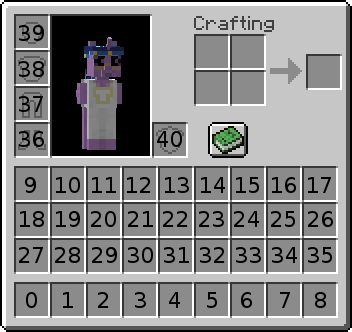
- 示例:
# Drop the item in main hand
- FORCE_DROP slot:-1

# Drop the item in slot 5
- FORCE_DROP slot:5

# Drop all items with the EI id "excalibursword" from the player's inventory
- FORCE_DROP ei_id:excalibursword
FRONTDASH
- 说明:将玩家/目标朝其面向的方向发射出去
- 命令设置:
{number}:发射力度的数值{custom_y}:设置垂直方向的助推(如果你不想跳得太高,建议设置为 0.5 - 1 之类的较小数值。){falldamage}:设置启用或禁用摔落伤害
- 示例:
- FRONTDASH 5 0.5 false
GLACIAL_FREEZE
- 说明:应用 Minecraft 1.18 粉雪的冻结效果
- 命令设置:
{time in ticks}:冻结时间(单位为 tick)。(20 ticks = 1 秒)- 示例:
- GLACIAL_FREEZE 160
GLOWING
- 说明:为玩家应用发光效果
- 命令设置:
{time in ticks}:发光持续时间(单位为 tick){color}:发光的颜色。颜色参考
- 示例:
- GLOWING 100 BLUE
HITSCAN_ENTITIES
- 说明:允许沿着特定方向对实体运行命令
- 命令设置:
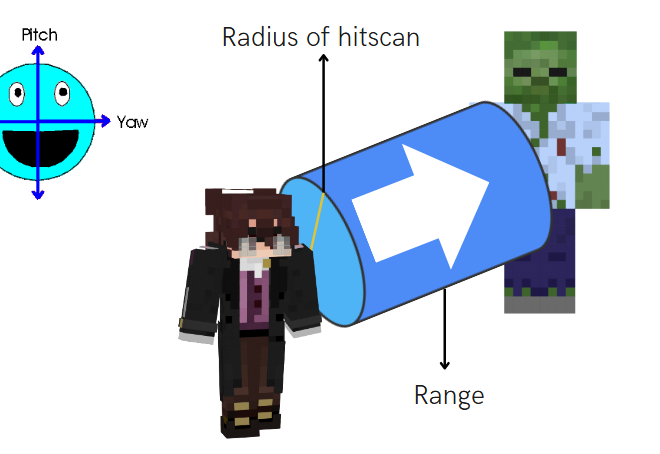
{range}:实体与你的距离在多远范围内可以被 HITSCAN 命令选中{radiusOfHitscan}:圆柱体有多宽。基本上就是射出子弹与射出炮弹的区别。{pitch}:相对于玩家 pitch 的射击方向{yaw}:与 Pitch 相同,但针对 yaw{leftRightShift}:- -5 = hitscan 从左侧 5 格处开始。
- 0 = Hitscan 以玩家所在位置为中心。
- 5 = hitscan 从玩家右侧 5 格处开始。
{yShift}:与左右相同,只是轴向不同。{throughEntities}:布尔值:HITSCAN 是否可以穿过实体。{throughBlocks}:布尔值:HITSCAN 是否可以穿过方块。{limit}:可以受影响的目标数量{sort}:对 limit 选项很有用。- NEAREST:选择距离原点最近的实体。
- RANDOM:在命令范围内随机选择任意实体。
{regionCheck}:true/false。如果为 true,AROUND 命令会检查目标是否位于野外或施法者的领地内(以 GriefPrevention 插件为准)(之后将更新为支持其他领地插件的检查){command(s)}:与 AROUND 命令相同,你可以输入command1 <+> command2... 并使用占位符 %around_target%
- 示例:
HITSCAN_ENTITIES range:5 radius:0 pitch:0 yaw:0 leftRightShift:0 yShift:0 throughBlocks:true throughEntities:true HEAL 10 <+> BACKDASH 5
HITSCAN_ENTITIES 之后的命令(以及每个 <+> 之后的命令)会像实体命令一样,在每个被命中的实体上运行:REGAIN_HEALTH 4 会治疗被命中的实体,而不是施法者。若要作用于施法者,请使用带有 %player% 的原版命令,例如 HITSCAN_ENTITIES range:8 DAMAGE 4 <+> effect give %player% instant_health 1 0 true。
- 辅助理解的图片:
HITSCAN_PLAYERS
- 说明:允许沿着特定方向对玩家运行命令
- 命令设置:
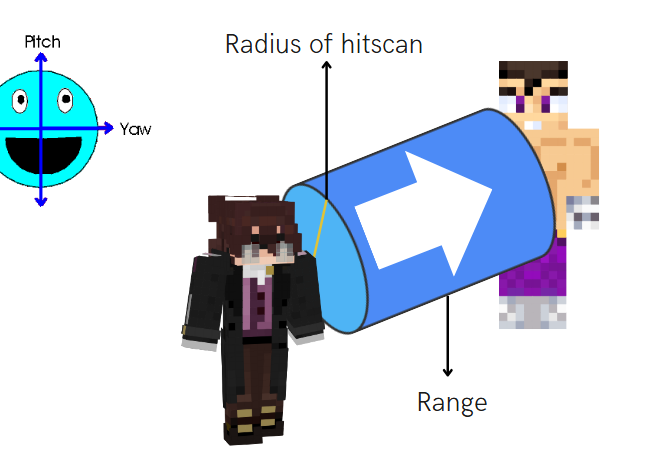
{range}:实体与你的距离在多远范围内可以被 HITSCAN 命令选中{radiusOfHitscan}:圆柱体有多宽。基本上就是射出子弹与射出炮弹的区别。{pitch}:相对于玩家 pitch 的射击方向{yaw}:与 Pitch 相同,但针对 yaw{leftRightShift}:- -5 = hitscan 从左侧 5 格处开始。
- 0 = Hitscan 以玩家所在位置为中心。
- 5 = hitscan 从玩家右侧 5 格处开始。
{yShift}:与左右相同,只是轴向不同。{throughEntities}:布尔值:HITSCAN 是否可以穿过实体。{throughBlocks}:布尔值:HITSCAN 是否可以穿过方块。{limit}:可以受影响的目标数量{sort}:对 limit 选项很有用。- NEAREST:选择距离原点最近的实体。
- RANDOM:在命令范围内随机选择任意实体。
{regionCheck}:true/false。如果为 true,AROUND 命令会检查目标是否位于野外或施法者的领地内(以 GriefPrevention 插件为准)(之后将更新为支持其他领地插件的检查){command(s)}:与 AROUND 命令相同,你可以输入command1 <+> command2... 并使用占位符 %around_target%
- 示例:
- HITSCAN_PLAYERS range:5 radius:0 pitch:0 yaw:0 leftRightShift:0 yShift:0 throughBlocks:true throughEntities:true DAMAGE 5 <+> JUMP 5
- 辅助理解的图片:
INVULNERABILITY
- 说明:让玩家在一定时间内处于无敌状态
- 命令设置:
{ticks}:无敌时间(单位为 tick)。(20 ticks = 1 秒)- 支持负值,用于减少无敌时间,例如受击后的无敌时间。
- 示例:
- INVULNERABILITY 60
JUMP
- 说明:将玩家发射到空中
- 命令设置:
{number}:发射力度{fall damage}:(可选)(默认 = false)选择是否希望该命令带有摔落伤害。
- 示例:
- JUMP 20
LAUNCH_ENTITY
- 说明:朝你的方向发射一个实体
- 命令设置:
{entityType}:被发射实体的生物 ID(全大写)EntityType 列表{speed}:(数字,Double)定义实体的速度[angle rotation y]:(仅适用于 1.14 及以上版本)(可选)(默认 = 0)(单位为度)定义实体被发射的方向
- 示例:
- LAUNCH_ENTITY PIG 2
- 实现三连发的示例:
- LAUNCH_ENTITY PIG 2
- LAUNCH_ENTITY PIG 2 15
- LAUNCH_ENTITY PIG 2 -15
MLIB_DAMAGE
- 说明:对目标造成伤害,但伤害类型主要来自 MythicLib 插件
- 命令设置:
{number}:对目标造成的伤害(默认:10){damage_type}:造成的伤害类型(默认:PHYSICAL)- 示例:MAGIC、PHYSICAL、WEAPON、SKILL、PROJECTILE、UNARMED、ON_HIT、MINION、DOT;
{knockback}:true/false,是否击退目标(默认:false){element}:指定攻击属于哪种元素(默认:FIRE){crit}:true/false,是否将攻击者的CRITICAL_STRIKE_POWER加入伤害公式(默认:false)- 公式:
number * (number * (total critical_strike_power/100))
- 公式:
- 示例:
- MLIB_DAMAGE 10 PHYSICAL false FIRE true
MOB_AROUND
- 说明:以特定半径内的实体为目标,并让它们运行命令
- 可用的实体 -> LivingEntity 列表
- 命令设置:
{distance}:命令选取实体的半径范围{displayMsgIfNoEntity}:(true 或 false)当未能选中任何生物时,是否通知物品使用者。- 设置为 false 可隐藏该消息
{throughBlocks}:是否影响位于方块后面的生物{safeDistance}:如果目标与发起者之间的距离小于或等于 safeDistance 的值,则该目标不会受到影响。{offsetYaw}:你希望偏移所朝向的 yaw 方向(与原点的 yaw 值无关){offsetPitch}:你希望偏移所朝向的 pitch 方向(与原点的 yaw 值无关){offsetDistance}:在计算出 offsetYaw 和 offsetPitch 之后,使用该值将 AROUND 命令的位置/中心点从原点的 xyz 坐标处移开。{limit}:可以受影响的目标数量{sort}:对 limit 选项很有用。- NEAREST:选择距离原点最近的实体。
- RANDOM:在命令范围内随机选择任意实体。
{regionCheck}:true/false。如果为 true,AROUND 命令会检查目标是否位于野外或施法者的领地内(以 GriefPrevention 插件为准)(之后将更新为支持其他领地插件的检查){nonliving}:true/false。如果为 true,它还会以箭矢和盔甲架等其他实体为目标。启用此参数时运行实体命令所出现的任何 bug,很可能会因范围蔓延而被忽略。- 你可以在命令的任意位置添加以下任一项,对实体设置黑名单或白名单:
- BLACKLIST(ZOMBIE,ARMOR_STAND)
- WHITELIST(CHICKEN)
你可以添加多条命令!请使用分隔符 <+>
示例:minecraft:effect give .. <+> DELAY 5 <+> DAMAGE 5
**占位符:**占位符与实体占位符相同,但需要将 "player" 替换为 "around_target"
示例:%around_target%、%around_target_uuid%
目标数量:%around_target_count% 返回命令所选中的实体数量。每个目标得到的数值相同,它统计的是经过 distance、safeDistance、throughBlocks、regionCheck 以及 WHITELIST(...) / BLACKLIST(...) 和 limit 筛选后保留的目标。对每个目标进行检查的 CONDITIONS(...) 不计算在内。它支持 +N / -N 简写:%around_target_count%-1。
示例:MOB_AROUND distance:8 WHITELIST(ZOMBIE) DAMAGE %around_target_count%
- 示例:
activators:
  activator0: # Activator ID, you can create as many activator on the activators list
    option: # Here goes an activator that is at least instance of player
    playerCommands:
    - MOB_AROUND distance:3 displayMsgIfNoEntity:true throughBlocks:true safeDistance:0 [conditions] COMMAND1 <+> COMMAND2 <+> ...
    - MOB_AROUND distance:3 displayMsgIfNoEntity:false BURN 10
    - MOB_AROUND distance:5 execute at %around_target_uuid% run summon lightning_bolt
    - MOB_AROUND distance:5 BLACKLIST(ZOMBIE,ARMOR_STAND) DAMAGE 20
    - MOB_AROUND distance:5 displayMsgIfNoEntity:false effect give %around_target_uuid% poison 10 10
    - MOB_AROUND distance:10 WHITELIST(ZOMBIE`{CustomName:"*"}`) say HELLO
若要在 WHITELIST/BLACKLIST 字段中使用实体 nbt,你需要安装 NBT API 插件
它支持 NBT Tags,因此你可以添加类似这样的内容:ZOMBIE{IsBaby:1}
示例:
activators:
  activator0: # Activator ID, you can create as many activator on the activators list
    option: # Here goes an activator that is at least instance of player
    playerCommands:
    - MOB_AROUND distance:7 BLACKLIST(ZOMBIE`{CustomName:"Test Test"}`,ZOMBIE`{CustomName:"Miyamoto"}`) false BURN 3
    - MOB_AROUND distance:5 WHITELIST(ZOMBIE`{IsBaby:1}`) DAMAGE 20
    - MOB_AROUND distance:9 WHITELIST(WOLF`{Owner:"%player%"}`) HEAL 5
    - MOB_AROUND distance:9 WHITELIST(WOLF`{Owner:%player_uuid%}`) HEAL 5
你可以将 MOB_AROUND 与以下命令嵌套:MOB_AROUND、IF、MOB_NEAREST、ALL_MOBS
如果这样做,分隔符和占位符会随嵌套层级而变化。\
基础命令分隔符:<+>
第一层嵌套命令:<+::step1>
... :<+::step2> ,<+::step3>,...
基础占位符:%around_target%
第一层嵌套命令:%around_target::step1%
... :%around_target::step2%、%around_target::step3%,...
MOB_NEAREST
- 说明:以距离玩家/目标最近的生物为目标。
- 命令设置:
{max accepted distance}:该“实体”可接受的最大距离。{command(s)}:将要执行的命令
你可以添加多条命令!请使用分隔符 <+>
示例:minecraft:effect give .. <+> DELAY 5 <+> DAMAGE 5
**占位符:**占位符与实体占位符相同,但需要将 "player" 替换为 "around_target"
示例:%around_target%、%around_target_uuid%
- 示例:
对最近的玩家造成伤害
- MOB_NEAREST 10 DAMAGE 5
你可以将 MOB_NEAREST 与以下命令嵌套:MOB_AROUND、IF、MOB_NEAREST、ALL_MOBS
如果这样做,分隔符和占位符会随嵌套层级而变化。\
基础命令分隔符:<+>
第一层嵌套命令:<+::step1>
... :<+::step2> ,<+::step3>,...
基础占位符:%around_target%
第一层嵌套命令:%around_target::step1%
... :%around_target::step2%、%around_target::step3%,...
NEAREST
- 说明:以距离玩家/目标最近的玩家为目标。
- 命令设置:
{max accepted distance}:该“目标”可接受的最大距离。{command}:将要执行的命令
你可以添加多条命令!请使用分隔符 <+>
示例:SEND_MESSAGE &cYou will be damaged in 5 seconds <+> DELAY 5 <+> DAMAGE 5
**占位符:**占位符与玩家占位符相同,但需要将 "player" 替换为 "around_target"
示例:%around_target%、%around_target_uuid%
- 示例:
对最近的玩家造成伤害
- NEAREST 8 DAMAGE 5
你可以将 NEAREST 与以下命令嵌套:AROUND、IF、NEAREST、ALL_PLAYERS
如果这样做,分隔符和占位符会随嵌套层级而变化。\
基础命令分隔符:<+>
第一层嵌套命令:<+::step1>
... :<+::step2> ,<+::step3>,...
基础占位符:%around_target%
第一层嵌套命令:%around_target::step1%
... :%around_target::step2%、%around_target::step3%,...
OPMESSAGE
- 说明:向在线的 OP 玩家和控制台发送消息
- 命令设置:
{text}:要发送的文本
- 示例:
- OPMESSAGE This is my debug message
PARTICLE
-
说明:在玩家/目标所在位置生成粒子。粒子列表
-
命令设置:
{type}:粒子的类型(全大写){quantity}:生成的粒子数量{offset}:粒子可能在玩家/目标所在位置生成的区域半径{speed}:粒子的速度或大小
-
示例:
- PARTICLE FIREWORKS_SPARK 10 0.1 0.5
REGAIN_HEALTH
- 说明:为你恢复指定数量的生命值
- 命令设置:
{amount}:你想要获得的生命值数量- 如果你想造成“真实伤害”,它支持负值。
- 示例:
- REGAIN_HEALTH 10
- REGAIN_HEALTH -5
REMOVE_BURN
- 说明:熄灭你身上的火焰
- 无命令设置
- 示例:
- REMOVE_BURN
REMOVE_GLOW
- 说明:移除玩家 | 目标身上指定颜色的发光效果。
- 命令设置:
[color]:(可选)(默认 = WHITE)要移除的颜色。颜色参考- 示例:
- REMOVE_GLOW BLACK
SET_GLOW
- 说明:为玩家 | 目标添加指定颜色的发光效果。
- 命令设置:
[color]:(可选)(默认 = WHITE)要移除的颜色。颜色参考- 示例:
- SET_GLOW BLACK
可通过 -> %score_cmd-glow% 与 TAB 插件兼容
SET_HEALTH
- 说明:将你的生命值设置为指定数量
- 命令设置:
{amount}:你想要设置的生命值数量
- 示例:
SET_HEALTH 10
SET_PITCH
- 说明:强制玩家看向指定的 pitch 位置(-90/90 度,上下方向)
- 命令设置:
{pitch_number}:你想要输入的数字。占位符同样有效{keepVelocity}:允许保留玩家的速度
- 示例:
- SET_PITCH 0 false
- SET_PITCH %target_pitch% false
SET_YAW
- 说明:强制玩家看向指定的 yaw 位置(360 度,左右方向)
- 命令设置:
{yaw_number}:你想要输入的数字。占位符同样有效{keepVelocity}:允许保留玩家的速度
- 示例:
- SET_YAW 10 false
SPIN
- 说明:让目标旋转
- 命令设置:
{duration ticks}:旋转的持续时间{velocity}:旋转的速度
- 示例:
- SPIN 20 1
问:如何冻结目标/玩家/生物?
答:例如运行 SPIN {duration} 0
STEAL
- 说明:从目标的物品栏中偷取一个物品
- 命令设置:
{slot}:-1 表示主手。请查看下方的栏位参考。[remove item]:(可选)(默认 = true)
- 示例:
- STEAL 10
STRIKELIGHTNING
- 说明:在运行该命令的对象处劈下一道不造成伤害的闪电
- 无命令设置
- 示例:
- STRIKELIGHTNING
这与 Essentials 的 smite 命令不同。如果你想对目标降下天罚,请将其放入 target commands 或 entity commands 中,并搭配合适的激活器,例如 PLAYER_CLICK_ON_PLAYER。
STUN ENABLE/DISABLE
- 说明:启用或禁用玩家的眩晕状态(会让你倒下并锁定你的视角移动)
- 命令:
- STUN_ENABLE
- STUN_DISABLE
- 示例:
- STUN_ENABLE
- DELAY 5
- STUN_DISABLE
TELEPORT
- 说明:将玩家/实体传送到指定位置
- 命令设置:
{world}:要传送到的位置所在的世界{x}:要传送到的位置的 x 坐标。{y}:要传送到的位置的 y 坐标。{z}:要传送到的位置的 z 坐标。[pitch]:(可选)(默认 = 保持玩家当前 pitch)传送位置的 pitch[yaw]:(可选)(默认 = 保持玩家当前 yaw)传送位置的 yaw[keepVelocity]:(可选)(默认 = true)允许不中断玩家的速度。
- 示例:
- TELEPORT ApocalypseWorld 70 70 70
TELEPORT_ON_CURSOR
- 说明:将你传送到光标所指的位置
- 命令设置:
{range}:你想要传送的距离{acceptAir}:若想在空中也能传送,需要将其设置为 true
- 示例:
- TELEPORT_ON_CURSOR 8 true
TRANSFER_ITEM
- 说明:转移物品栏中的一个物品
- 命令设置:
{slot of launcher}:将要移动的物品所在的栏位{slot of receiver}:物品将要落入的栏位
- 示例:
- TRANSFER_ITEM 38 40
UNSAFE_TELEPORT_ON_CURSOR
- 说明:将你传送到光标所指的位置,且不考虑你最终是否会处于不可能存在的位置
- 命令设置:
[maxRange]:(可选)(默认 = 200)你想要传送的距离
- 示例:
UNSAFE_TELEPORT_ON_CURSOR 20
WORLD_TELEPORT
- 说明:传送到另一个世界的相同位置
- 命令设置:
{world}:你想要将玩家/目标传送到的世界名称。- 示例:
- WORLD_TELEPORT spawn_end
Animation Commands
- BREAK_BOOTS_ANIMATION
- BREAK_CHESTPLATE_ANIMATION
- BREAK_HELMET_ANIMATION
- BREAK_LEGGINGS_ANIMATION
- BREAK_MAIN_HAND_ANIMATION
- BREAK_OFF_HAND_ANIMATION
- HURT_ANIMATION
- SWING_MAIN_HAND
- SWING_OFF_HAND
- TELEPORT_ENDER_ANIMATION
- TOTEM_ANIMATION
立即试用
复制到 ExecutableItems 中并重载
摘自本页。将其粘贴到配置中,运行插件的重载命令,你就有了一个可以直接编辑的可用起点。
activators:
  activator0: # Activator ID, you can create as many activators on the activators list
    option: # Here goes an activator that is at least instance of player
    playerCommands:
    - ALL_PLAYERS SEND_MESSAGE Hello %parseother_`{%around_target%}`_`{player_name}`%
  activator1: # Activator ID, you can create as many activators on the activators list
    option: # Here goes an activator that is at least instance of target
    targetCommands:
    - ALL_PLAYERS SEND_MESSAGE %target% has been hit by %player%
  activator2: # Activator ID, you can create as many activators on the activators list
    option: # Here goes an activator that is at least instance of entity
    entityCommands:
- ALL_PLAYERS SEND_MESSAGE %entity% has been hit by %player%本页使用的插件
ExecutableItems带有能力、激活器和命令的自定义物品,无需写代码。
- 5.0/5,共 10 条评价
- 当前有 3.1K 个服务器正在运行(bStats)
- 在 SPlugins 上已有 103 次下载
€19.99
一次性付款,终身更新